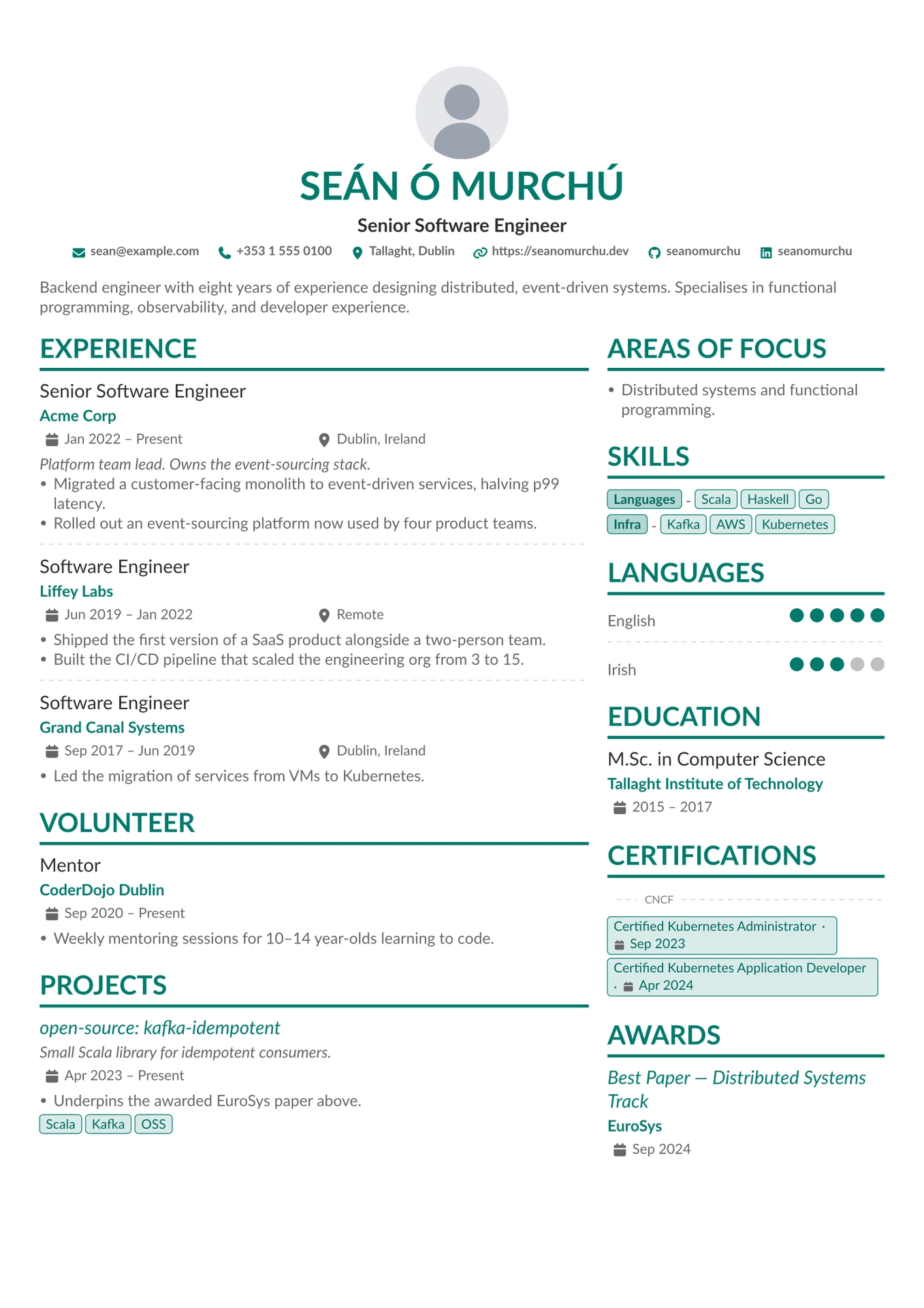


A Typst CV template inspired by LianTze Lim's AltaCV (LaTeX). Data-driven from a JSON Resume-style dict; configurable theme, labels, and sections.

Contents
- Features
- Gallery
- Getting started
- Fonts
- Data schema
- Configuration
- Header QR code
- PDF metadata
- Helpers
- Building the examples
- Credits
- License
Features
- Data-driven from JSON Resume. Round-trips a canonical
resume.jsonwith three optional extensions (focusAreas, numeric languagerating, publicationtypegrouping). - Single-column ATS mode (
columnRatio: 1) alongside the default two-column layout, plus inverted variants with the side panel on either side. - Six accent palettes —
teal,navy,crimson,forest,plum,charcoal— or anyrgb(...)value. - Full label localisation via inline dict or TOML file. Every display string is overridable; see
examples/labels-ga.tomlfor a worked Irish translation. - PDF metadata baked in — title, author, subject, keywords (auto-derived from skills), and document date populate from the same data dict.
- Optional header QR code linking to
basics.url(or any URL), restoring one click of digital-PDF affordance for printed CVs.
Gallery
Every documented section rendered in a single multi-page CV. Source: examples/example_full.typ ; rendered output: examples/example_full.pdf.
| Page 1 | Page 2 |
|---|---|
 |
 |
Getting started
Pick the path that matches how your data lives.
Scaffold a new project
Best when you are starting from scratch. Copies a working starter into your project.
typst init @preview/altacv
The starter is template/cv.typ — an inline data dict you fill in.
From an existing resume.json
Best when your CV already lives in a canonical resume.json (JSON Resume schema). alta-from-json reads, validates, and renders it in one call:
#import "@preview/altacv:1.5.0": alta-from-json

#alta-from-json(path("resume.json"))
Validation runs through @preview/gairm-import. Dates must be ISO 8601 (YYYY, YYYY-MM, YYYY-MM-DD); altacv’s three extensions are optional, so a vanilla resume.json validates without edits.
To inspect or transform the parsed dict before rendering, use from-json-resume directly:
#import "@preview/altacv:1.5.0": alta, from-json-resume

#alta(from-json-resume(path("resume.json")), preferences: (accent: rgb("#0a4")))
From an inline dict
Best when you want the CV data in Typst alongside the call. Import into an existing .typ:
#import "@preview/altacv:1.5.0": alta

#let cv = (
  basics: (
    name: "Jane Doe",
    label: "Senior Software Engineer",
    summary: [Backend engineer with eight years' experience…],
    email: "jane@example.com",
    phone: "+353 1 555 0100",
    location: "Dublin, Ireland",
    profiles: (
      (network: "LinkedIn", username: "janedoe",     url: "https://linkedin.com/in/janedoe"),
      (network: "GitHub",   username: "janedoe",     url: "https://github.com/janedoe"),
      (network: "Website",  username: "janedoe.dev", url: "https://janedoe.dev"),
    ),
  ),
  work: (
    (
      name: "Acme Corp",
      url: "https://acme.example.com", // optional — wraps the company name in a link
      position: "Senior Software Engineer",
      location: "Dublin, Ireland",
      startDate: "Jan 2022",
      // omit endDate → renders as "Present"
      highlights: ([Led the migration…], [Designed the platform…]),
    ),
  ),
  skills: (
    (name: "Languages", keywords: ("Scala", "Python")),
    (name: "Infra",     keywords: ("Kafka", "AWS", "Kubernetes")),
  ),
  languages: (
    (language: "English", fluency: "Native"),
    (language: "Irish",   fluency: "Professional Working"),
  ),
  // … education, certificates, publications
)

#alta(cv)
For a multi-page demo exercising every section and input form, see examples/example_full.typ (rendered in Gallery above).
Fonts
altacv needs two fonts available wherever you compile:
- Lato — the default body font. Overridable via
preferences.font. - FontAwesome v7 desktop set — read by
@preview/fontawesomefor the contact-bar and section icons.
Neither is vendored in the package. The Typst web app has both preinstalled.
On macOS, Homebrew covers Typst plus both fonts:
brew install typst
brew install --cask font-lato font-fontawesome
On other platforms, install Lato from Google Fonts and the FontAwesome v7 desktop OTFs from fontawesome.com/download. The Debian/Ubuntu fonts-font-awesome package ships v6, which the Typst package does not read by default.
Run typst fonts to confirm both are visible; if FontAwesome is missing, icons render as tofu. Any other body font works: #alta(cv, preferences: (font: "Inter")).
Data schema
The cv dict follows JSON Resume. An empty or missing endDate renders as Present (localisable via labels.present). Sections with empty input are skipped — no orphan headings. Unknown top-level keys panic.
Extensions
Three optional fields layered on top of JSON Resume:
focusAreas— top-level array of prose items, rendered as a bulleted “Areas of Focus” section. Distinct from JSON Resume’sinterests(structured{name, keywords}— also supported).languages[].rating— numeric 0–preferences.maxRating(default 5). JSON Resume uses afluencystring; supplyingratingenables half-dot precision and wins overfluencywhen both are present. Fractions must be in 0.5 increments (anything else panics — the renderer only expresses full or half dots). Unknownfluencystrings render as a small annotation in place of the dots, so a canonicalresume.jsonwith"fluency": "Fluent"works without edits.publications[].type— optional grouping key (e.g."Articles","Books","Talks"). Entries sharing atypecluster under a subheading rendered verbatim from the string; entries withouttypefall underlabels.articles. Localise vialabels.articlesor by supplying already-translatedtypevalues.
Top-level keys
Recognised: basics, focusAreas, work, volunteer, skills, languages, education, certificates, awards, projects, publications, interests, references, meta (PDF metadata only — see PDF metadata).
Dates
ISO 8601 strings ("2024", "2024-06", "2024-06-15" — the JSON Resume canonical shape) are formatted according to preferences.dateFormat (default "long": e.g. "Jun 2024"). Strings that do not parse as ISO (e.g. "Jan 2022", "May 2016 – Jul 2017") pass through verbatim, so pre-formatted data keeps rendering identically.
basics
basics.url (JSON Resume’s “personal homepage” field) renders in the contact bar with a generic link icon, alongside email, phone, location, and profiles. It is distinct from a basics.profiles entry with network: "Website" (a profile on a third-party site); supply both if you want both rendered. The same basics.url also drives the header QR matrix when preferences.qrCode: auto is set — see Header QR code.
basics.location accepts a plain string or JSON Resume’s structured dict {address, postalCode, city, countryCode, region}. A string flows verbatim into the contact bar and the maps deep link. A dict is collapsed by joining city, region, countryCode with ", ", skipping missing fields — (city: "Dublin", region: "Leinster", countryCode: "IE") → Dublin, Leinster, IE; (city: "Tokyo") → Tokyo. address and postalCode are accepted for resume.json round-tripping but not rendered (a CV header is not a mailing label). Unknown keys panic. The joined string also drives the maps link, so display and link stay in sync.
Portrait (basics.image)
Setting basics.image adds a circular portrait to the header. Three accepted source forms:
// Recommended: a path() (Typst 0.15.0+). Resolution is anchored to
// the file where path() is called — your own cv.typ — so the lookup
// stays correct even though image() ultimately runs inside the
// package.
basics: (
  image: path("avatar.png"),
  ...
)

// Equivalent: load the bytes in your own typ file. Same resolution
// guarantee, embedded as bytes instead of a reference.
basics: (
  image: read("avatar.png", encoding: none),
  ...
)

// Also accepted: a root-relative path (leading "/", anchored to the
// `--root` dir passed to `typst compile`). Bare relative strings
// without a leading "/" resolve relative to an internal package
// file and are not portable — prefer path() instead.
basics: (
  image: "/avatar.png",
  ...
)
JSON Resume’s spec calls for a URL here, but Typst does not fetch remote URLs at compile time — vendor the asset locally.
Move the portrait with preferences.imagePosition ("left" / "right" for the two-column header, or "center" to stack it above/below the text block via preferences.imageStackOrder). Size via preferences.imageSize (default 6em); the image is fit with cover and clipped to a circle, so rectangular sources crop centred rather than distort.
Section reference
Each per-section entry follows JSON Resume’s schema. Tables show the practical subset rendered. Where dates appear, startDate / endDate follow the same conventions (omit endDate → “Present”); summary accepts a string or [...] content for markup.
Work
| Field | Type | Effect |
|---|---|---|
position |
string | Job title. Entry heading. |
name |
string | Company / employer, accent colour beneath the title; wrapped in a link when url is supplied. |
url |
string | Wraps name in a link (visual treatment unchanged — bold accent, no italic / underline). |
location |
string | Rendered alongside the date range via the location-icon row. |
startDate / endDate |
string | Date range. |
summary |
string or content | Italic preamble between the date row and the highlights list. |
description |
string or content | Alternative spelling used by some exporters — rendered identically to summary; summary wins when both are supplied. |
highlights |
array of content | Bulleted list of accomplishments. |
Volunteer
Same shape as work[], but with organization in place of name.
| Field | Type | Effect |
|---|---|---|
position |
string | Role title. Entry heading. |
organization |
string | Granting organisation, accent colour beneath the position. |
location |
string | Rendered next to the date range. |
startDate / endDate |
string | Date range. |
highlights |
array of content | Bulleted list of accomplishments. |
By default volunteer renders in the left column directly below work, so it reads as a continuation of the experience block. Move it via preferences.leftColumnSections / preferences.rightColumnSections.
Education
| Field | Type | Effect |
|---|---|---|
institution |
string | School name. Accent-bold beneath the qualification title; wrapped in a link to url when supplied. |
url |
string | Wraps the institution name in an accent-bold link (styling preserved, just clickable). |
studyType |
string | Qualification (e.g. “M.Sc. in Computer Science”). Entry heading. Falls back to area if absent. |
area |
string | Field of study. Used as the heading only when studyType is missing. |
startDate / endDate |
string | Date range. |
score |
string | Grade / classification, plain line below the date range. |
courses |
array of strings | Row of pill tags below the score (same treatment as skills[].keywords and projects[].keywords). |
Projects
| Field | Type | Effect |
|---|---|---|
name |
string | Project title. Heading; linked to url when supplied. Missing / empty name → entry silently skipped. |
description |
string | Italic subtitle under the title, body colour. |
url |
string | Wraps the title in an accent-coloured link. |
startDate / endDate |
string | Date range. |
highlights |
array of content | Bulleted list of accomplishments. |
keywords |
array of strings | Row of pill tags below the highlights. |
Awards
url is an altacv extension on top of JSON Resume.
| Field | Type | Effect |
|---|---|---|
title |
string | Award name. Entry heading; linked to url when supplied. Missing / empty title → entry silently skipped. |
awarder |
string | Granting organisation, accent colour beneath the title. |
date |
string | Single date (not a range). Calendar-icon row. |
url |
string | Wraps the title in an accent-coloured link — for a paper, conference page, or write-up. |
summary |
string or content | Paragraph below the date. |
Publications
type is an altacv extension on top of JSON Resume.
| Field | Type | Effect |
|---|---|---|
name |
string | Publication title. Bullet body; linked to url when supplied, italicised when not. |
publisher |
string | Subtitle below the title, body colour at 0.85em. |
releaseDate |
string | Single date (not a range). Below the publisher in a lighter shade. |
url |
string | Wraps the title in an accent-coloured link. |
summary |
string or content | Paragraph below the date. |
type |
string | Optional grouping key (see Extensions). |
All fields are optional — omitted fields drop their line.
Certificates
| Field | Type | Effect |
|---|---|---|
name |
string | Certificate name. Rendered as a pill tag; linked to url when supplied. Missing / empty name → entry silently skipped. |
issuer |
string | Granting organisation. When preferences.groupCertificates is true, certs from the same issuer cluster into a single pill row prefixed by a darker issuer-label pill; singletons pool into a trailing unlabelled group. |
date |
string | Single date. Small body-coloured text inline to the right of the pill, sharing the same baseline. |
url |
string | Wraps the pill in a link to the credential. |
Interests
Same {name, keywords} shape as skills[], rendered with the same pill-tag layout (name as a label-tag, each keywords entry as a regular tag). Use for personal interests / hobbies; reach for focusAreas instead when you want prose-style bullets.
| Field | Type | Effect |
|---|---|---|
name |
string | Category label, leading “label” pill on the row. |
keywords |
array of strings | Items in the category. Entries with an empty keywords array are silently skipped. |
interests: (
  (name: "Music", keywords: ("Trad", "Jazz")),
  (name: "Sport", keywords: ("Hurling", "Climbing")),
)
References
| Field | Type | Effect |
|---|---|---|
name |
string | Referee name, level-3 heading above the quote. Omitted entries render the quote anonymously. |
reference |
string or content | The referee’s quote, italic, beneath the name. Missing / empty reference → entry silently skipped (no orphan heading). |
When references[] is empty (or every entry lacks a reference) and preferences.referencesAvailableOnRequest is true, the section renders the conventional References available upon request. line under the heading instead of being suppressed. The line text is labels.referencesAvailableOnRequest, so it localises alongside the other display strings.
Profile networks
The network field of each basics.profiles entry is matched case-insensitively against a curated icon set. Built-in networks: Bluesky, GitHub, GitLab, Link, LinkedIn, Mastodon, Medium, Stackoverflow, Twitter (alias: X), Website. Use Link as a generic fallback for any URL without a brand. Unknown networks panic with a list of the supported set.
To add another, map the new key to its FontAwesome glyph name in _network_icons (internal/icons.typ) — see CONTRIBUTING.md.
Icons are resolved via @preview/fontawesome, which renders glyphs from the desktop FontAwesome fonts. See Fonts for local installation; on typst.app they are preinstalled.
Unrendered JSON Resume fields
These fields are accepted (so a verbatim resume.json round-trips without panicking) but not yet rendered:
volunteer[].summary,volunteer[].urlprojects[].entity,projects[].type,projects[].rolesmeta.canonical,meta.version
Open or upvote an issue if you need one rendered.
Configuration
alta() arguments
#alta(cv, labels: (:), preferences: (:))
cv is the data dict; labels and preferences are partial dicts that shallow-merge over the built-in defaults. Unknown keys panic — catches typos.
Preferences
Override any subset of the keys below.
| Key | Default | Effect |
|---|---|---|
font |
"Lato" |
Primary font family. Must be installed. |
bodySize |
10pt |
Base text size. Sub-elements scale via em-multipliers. |
paper |
"a4" |
Paper size string passed to Typst’s set page(paper: ...). "a4", "us-letter", "a5", "us-legal", and the rest of Typst’s named papers. |
margin |
(x: 0.9cm, y: 1.5cm) |
Page margins. Anything set page(margin: ...) accepts. |
accent |
palettes.teal |
Theme colour for headings, accent rules, tags, dots. A built-in preset — palettes.{teal,navy,crimson,forest,plum,charcoal} — or any rgb(...) value. |
groupCertificates |
true |
When true, cluster 2+ certs from the same issuer under a darker issuer-label pill; singletons pool into a trailing unlabelled group. When false, render flat — each cert next to its own issuer label. Certs with no issuer render unlabelled either way. |
imageSize |
6em |
Diameter of the circular portrait. Ignored when no basics.image. |
imagePosition |
"right" |
Portrait position in the header — "left" / "right" (two-column header) or "center" (own centred row, stacked with the text block). Ignored when no basics.image. |
imageStackOrder |
"above" |
When imagePosition is "center": "above" / "below" the name/label/contact block. Ignored otherwise. |
headerTextAlign |
"left" |
Horizontal alignment of the header text (name, label, contact bar). One of "left", "right", "center". Applies whether or not basics.image is set. |
qrCode |
none |
none (skip), auto (encode basics.url), or any non-empty URL string. See Header QR code. |
uppercaseName |
true |
When true (matching AltaCV’s visual ancestor), basics.name renders in uppercase. Set to false for scripts where uppercase is a different glyph set (Turkish dotless-i, etc.), scripts with no case, or when the loud look is not wanted. |
lastModifiedFooter |
false |
When true and meta.lastModified is set, renders a small right-aligned <labels.lastModified>: <meta.lastModified> line in the page footer (timestamp passed through verbatim). PDF metadata is enriched independently — see PDF metadata. |
referencesAvailableOnRequest |
false |
When true and references[] is empty (or every entry has no reference quote), renders the conventional labels.referencesAvailableOnRequest line under the References heading instead of suppressing the section. |
dateFormat |
"long" |
"long" ("Jun 2024"), "short" ("06/2024"), "iso" (passthrough), a bracketed datetime.display() template, or a closure (year, month, day) => str. Non-ISO source strings pass through verbatim. |
linkContactInfo |
true |
true / false for uniform linking, or a partial dict keyed by "email" / "phone" / "location" / "url" / "profiles" to opt out per channel. |
mapsProvider |
maps-providers.google |
URL template for the basics.location deep link; {q} is replaced with the URL-encoded location. Built-in: maps-providers.{google,apple,bing,duckduckgo,osm}. none suppresses the link (icon + text still render). |
columnRatio |
0.65 |
Left-column width as a fraction of the page, in (0, 1]. The right column gets the remainder minus a fixed gutter. Use 1 - r to invert the layout, or 1 for a single-column layout. |
pageFooter |
none |
Optional page footer. none — no footer. "auto" — multi-page documents only, basics.name flush left and Page N / M flush right, 0.8em body colour. Any content value ([…], align(...), etc.) — rendered verbatim on every page. Anything else panics. When non-none, takes precedence over lastModifiedFooter. |
leftColumnSections |
("work", "volunteer", "projects", "publications") |
Sections to render in the left column, in order. Defaults put long-form / bulleted sections on the wider left. |
rightColumnSections |
("focusAreas", "skills", "languages", "education", "certificates", "awards", "interests", "references") |
Sections to render in the right column, in order. Defaults put compact / horizontal sections (pill rows, dot ratings, short metadata) on the right. |
maxRating |
5 |
Number of dots on the language fluency scale. Positive integer. Default matches LinkedIn’s 0–5 scale (and the built-in fluency string map); set to 6 for CEFR (A1–C2), 4 for ILR-style 0–4, etc. Fluency strings stay anchored to the 0–5 LinkedIn scale, so non-5 maxRating requires numeric languages[].rating values. |
Both column arrays draw from the same section keys: "work", "volunteer", "focusAreas", "skills", "languages", "education", "certificates", "awards", "projects", "publications", "interests", "references". Sections omitted from both are not rendered even if their data is present; sections listed in both render twice. Unknown keys panic. Renderers are width-agnostic — combined with columnRatio, this enables layouts like an inverted CV where the side-panel sections take the narrow left column.
Examples
Reorder the right-column sections, switch to navy, and use US Letter:
#import "@preview/altacv:1.5.0": alta, maps-providers, palettes

#alta(cv, preferences: (
  paper: "us-letter",
  accent: palettes.navy,
  groupCertificates: false,
  imageSize: 7em,
  linkContactInfo: false,           // contact bar as plain text
  mapsProvider: maps-providers.osm, // OpenStreetMap for `basics.location`
  // Move education above skills; hide publications.
  rightColumnSections: ("focusAreas", "education", "skills", "languages", "certificates"),
))
Invert the template (side panel on the narrow left, experience on the wide right):
#alta(cv, preferences: (
  // columnRatio is the LEFT column's width; 0.35 = complement of the default 0.65.
  columnRatio: 0.35,
  leftColumnSections: ("focusAreas", "skills", "languages", "education", "certificates"),
  rightColumnSections: ("work", "publications"),
))
Opt out of links per channel (everything stays linked except phone):
#alta(cv, preferences: (
  linkContactInfo: (phone: false),
))
Single-column layout
Set columnRatio: 1 to collapse the grid to a single full-width column — useful for ATS parsers that struggle with multi-column PDFs. Sections from both leftColumnSections and rightColumnSections stream top-to-bottom in left-then-right order. With the defaults: work → volunteer → projects → publications → focusAreas → skills → languages → education → certificates → awards → interests → references.
#alta(cv, preferences: (columnRatio: 1))
Reorder by overriding either array; both are concatenated in order:
#alta(cv, preferences: (
  columnRatio: 1,
  leftColumnSections: ("work", "education"),
  rightColumnSections: ("skills", "languages", "certificates"),
))
Drop the portrait via basics.image: none for a fully text-only header.
Labels
All display strings the template emits. Override any subset via labels:; the rest fall back to English defaults. Unknown keys panic. Use for translation or local renaming.
Label keys match the JSON Resume section keys (work, certificates, …) — the data-field name and the heading-override key are the same. The default values still read “Experience” and “Certifications” — that is editorial.
| Key | Default |
|---|---|
work |
"Experience" |
volunteer |
"Volunteer" |
focusAreas |
"Areas of Focus" |
skills |
"Skills" |
languages |
"Languages" |
education |
"Education" |
certificates |
"Certifications" |
publications |
"Publications" |
awards |
"Awards" |
projects |
"Projects" |
interests |
"Interests" |
references |
"References" |
referencesAvailableOnRequest |
"References available upon request." |
articles |
"Articles" |
present |
"Present" |
lastModified |
"Last updated" |
months |
("Jan", "Feb", "Mar", "Apr", "May", "Jun", "Jul", "Aug", "Sep", "Oct", "Nov", "Dec") |
publicationIcons |
(:) |
labels.months is the twelve abbreviated month names (January–December). Consumed by the dateFormat: "long" formatter and the [month repr:long] / [month repr:short] template tokens. Override to localise; must keep length 12.
labels.publicationIcons maps publications[].type values to icon names. Built-in defaults (case-insensitive, singular and plural both accepted):
type value |
Icon |
|---|---|
article / articles / blog post / blog posts |
newspaper |
book / books |
book |
talk / talks / presentation / presentations |
microphone |
paper / papers / conference paper / conference papers |
newspaper |
| anything else | file |
The supplied dict layers over the defaults rather than replacing them — override only to add a custom type or remap a built-in.
Example — German, plus renaming “Skills” to “Core Technologies”:
#alta(cv, labels: (
  work:         "Berufserfahrung",
  focusAreas:   "Schwerpunkte",
  skills:       "Core Technologies",
  languages:    "Sprachen",
  education:    "Ausbildung",
  certificates: "Zertifikate",
  publications: "Veröffentlichungen",
  present:      "Heute",
  months: ("Jan", "Feb", "Mär", "Apr", "Mai", "Jun", "Jul", "Aug", "Sep", "Okt", "Nov", "Dez"),
))
Translation workflow
The defaults live in internal/labels-en.toml — a plain resource file a translator can be handed without learning Typst syntax. For full translations, copy that file, translate the values, and load it at the call site with the built-in toml(...):
// Inline partial overrides — best for one-off renames or a few keys.
#alta(cv, labels: (work: "Berufserfahrung", skills: "Core Technologies"))

// File-based — best for full translations or strings owned by a translator.
#alta(cv, labels: toml("labels-ga.toml"))
toml(...) resolves the path relative to the calling .typ file, so the translation lives next to the CV source. The returned dict flows through the same labels: argument and shallow-merges over the English defaults — unknown keys still panic, partial files still work. See examples/labels-ga.toml and the demo CV in examples/example_ga.typ for a worked Irish translation.
Header QR code (preferences.qrCode)
Printed CVs lose the clickability of digital PDFs. A QR matrix in the header rescues one link (the homepage) so a phone camera takes the reader straight there. Off by default; opt in via preferences.qrCode:
#alta(
  (basics: (
    name: "Jane Doe",
    url: "https://janedoe.dev",  // canonical home page
    // …
  )),
  preferences: (qrCode: auto),  // encode basics.url
)
preferences.qrCode accepts three shapes:
none(default) — no QR rendered.auto— encodebasics.url. Panics ifbasics.urlis missing or empty.- any non-empty string — treat it as the URL to encode directly. Useful when the printed CV should point at a tracked landing page distinct from
basics.url.
The QR sits on the side of the header opposite the portrait (so the default imagePosition: "right" puts the QR on the left). With imagePosition: "center", the QR pins the header’s top-left corner, riding the photo row when the photo is on top and the text row otherwise. The matrix inherits preferences.accent, renders at roughly 3.5em, and is wrapped in link() so digital readers can click through.
QR generation is delegated to @preview/zebra.
PDF metadata
The rendered PDF carries metadata in its document properties — what your OS shows in “Get Info” / “Properties” and what indexing services read. Fields populate from the data dict; each is only written when its source is non-empty.
| PDF field | Source | Notes |
|---|---|---|
| Title | basics.name + " --- CV" |
Always set. |
| Author | basics.name |
Always set; canonical (ignores preferences.uppercaseName). |
| Subject | basics.summary |
Same content rendered in the document header. |
| Keywords | skills[].keywords |
Flattened across every skill group, de-duplicated, insertion order preserved. |
| Date (CreationDate / ModDate) | meta.lastModified |
ISO 8601 — YYYY-MM-DD or YYYY-MM-DDTHH:MM:SSZ; only the calendar part is used. Falls back to compile time when absent or unparseable. |
To also surface “last updated” in the rendered document, set preferences.lastModifiedFooter: true.
meta: (
  lastModified: "2026-06-12", // → PDF date + optional footer
  // canonical / version: accepted, currently unrendered
)
Helpers
alta() uses these internally; importing them lets you compose a custom section, or preview a single helper in isolation:
| Helper | Purpose |
|---|---|
icon(name, size: auto, shift: auto, fill: auto) |
Render a FontAwesome glyph (delegated to @preview/fontawesome). name is any key from the built-in icon set (utility or network). |
name(body) |
Bold accent-coloured line — the company / institution row under a role. |
term(period, location: none) |
Two half-width boxes for a date range and optional location, each with a leading icon. |
rating(label, value) |
Label on the left, filled / half-filled / empty dots on the right. value is numeric 0–preferences.maxRating (default 5); fractions must be in 0.5 increments (2.3 panics). Drives the language fluency dots; works for any row on the configured scale. Shares a name with the languages[].rating data field — the function is not auto-fed; pass the value explicitly. |
tag(body, label: false, trailing: true) |
Pill-style tag. label: true for a darker, bold “category” variant. trailing: false suppresses trailing horizontal space — use for the last tag in a row so it does not push the next line’s leading edge inward. |
divider() |
Dashed grey rule used between entries within a section. |
styled-link(content, dest: none) |
Accent-coloured italic styling for entry titles (publications, awards, projects). Wraps in a link when dest is supplied. |
palettes |
Dict of curated accent presets — teal, navy, crimson, forest, plum, charcoal. Use as accent: palettes.navy. |
maps-providers |
Dict of map deep-link URL templates — google, apple, bing, duckduckgo, osm. Use as mapsProvider: maps-providers.osm. |
#import "@preview/altacv:1.5.0": alta, tag, divider, palettes, maps-providers
The contact bar is rendered from basics.email, basics.phone, basics.location, basics.url, basics.profiles. Visual separators are stripped from the tel: dialable part. Suppress or swap deep links via preferences.linkContactInfo and preferences.mapsProvider.
Building the examples
typst compile --root . examples/example_full.typ examples/example_full.pdf
To regenerate the preview artefacts (the canonical CV render, the animated GIF that cycles through preference variations, the multi-page gallery PNGs, and the Universe package-card thumbnail):
make cv             # examples/cv.pdf + examples/cv.png from template/cv.typ
make example-full   # examples/example_full.pdf + examples/example_full-{1,2,…}.png
make thumbnail      # thumbnail.png (Universe package card, 250 PPI)
make preview-gif    # examples/preview.gif (requires ffmpeg)
The GIF is sourced from examples/preview-frames.typ — one page per variation, stitched by ffmpeg with palettegen / paletteuse for higher-quality colour quantisation. Add a frame by appending a preferences dict to the frames array in that file.
Credits
- LianTze Lim — AltaCV (LPPL). The visual ancestor: the two-column layout, accent palette, and section structure originate in LianTze’s LaTeX class.
- George Honeywood — alta-typst (MIT, © 2023). Prior Typst implementation; the grid layout, pill tags, and half-fill skill dots originate there.
License
MIT. Copyright © 2023 George Honeywood, © 2026 Shane Murphy.