


#import "@preview/typsium:0.3.2":*
Enter your chemical formula or reaction into the #ce" method like this:
#ce("[Cu(H2O)4]^2+ + 4NH3 -> [Cu(NH3)4]^2+ + 4H2O")

Molecule parsing is flexible and supports many different ways of writing, so you can copy and paste your formulas, and they will probably work. You can use many kinds of brackets.
You can also embed any kind of content, such as organic molecules into your chemical reactions by passing in content instead of a string. This will also apply any styling to the reaction but should look exactly the same if you just leave it be.
#ce[[Cu(H2O)4]^2+ + 4NH3 -> [Cu(NH3)4]^2+ + 4H2O]
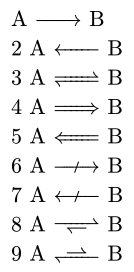
There are many different kinds of arrows to choose from.
#ce("1A -> B")\
#ce("2A <- B")\
#ce("3A <=> B")\
#ce("4A => B")\
#ce("5A <= B")\
#ce("6A -/> B")\
#ce("7A </- B")\
#ce("8A <=>> B")\
#ce("9A <<=> B")\
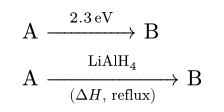
And you can add additional arguments to them (such as the top or bottom text) by adding square brackets.
#ce("->[top][bottom]")
#ce[A ->[#qty("2.3", "electronvolt")] B]
#ce[A ->[LiAlH4][($Delta H$, reflux)] B]
Oxidation numbers can be added like this^^I, radicals can be added like this^., and hydration groups can be added like this*.
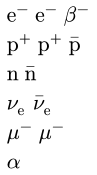
You can use shorthand versions of particle names to display nicely rendered particles
#ce("electron") #ce("e-") #ce("beta-") \
#ce("proton") #ce("p+") #ce("antiproton")\
#ce("neutron") #ce("antineutron")\
#ce(" neutrino antineutrino")\
#ce("mu-") #ce("muon-")\
#ce("alpha")\
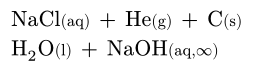
You can apply aggregation state information and we will make it prettier
#ce("NaCl(aq) + He(g) + C(s)")\
#ce[H2O(l) + NaOH(aq,oo)]\
When writing Isotopes it is important that this specific order is used. Otherwise the notation is similar to counts and charges, just before the Symbol.
#ce("^227_90Th+")
You can use Typsium within other packages, and the styling will be consistent throughout the document.