

json
Reads structured data from a JSON file.
The file must contain a valid JSON value, such as object or array. The JSON values will be converted into corresponding Typst values as listed in the table below.
The function returns a dictionary, an array or, depending on the JSON file, another JSON data type.
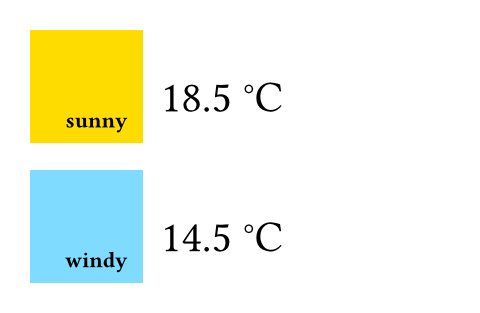
The JSON files in the example contain objects with the keys temperature, unit, and weather.
Example
#let forecast(day) = block[
#box(square(
width: 2cm,
inset: 8pt,
fill: if day.weather == "sunny" {
yellow
} else {
aqua
},
align(
bottom + right,
strong(day.weather),
),
))
#h(6pt)
#set text(22pt, baseline: -8pt)
#day.temperature °#day.unit
]
#forecast(json("monday.json"))
#forecast(json("tuesday.json"))
Conversion details
| JSON value | Converted into Typst |
|---|---|
null | none |
| bool | bool |
| number | float or int |
| string | str |
| array | array |
| object | dictionary |
| Typst value | Converted into JSON |
|---|---|
| types that can be converted from JSON | corresponding JSON value |
bytes | string via repr |
symbol | string |
content | an object describing the content |
other types (length, etc.) | string via repr |
Notes
In most cases, JSON numbers will be converted to floats or integers depending on whether they are whole numbers. However, be aware that integers larger than 263−1 or smaller than −263 will be converted to floating-point numbers, which may result in an approximative value.
Bytes are not encoded as JSON arrays for performance and readability reasons. Consider using
cbor.encodefor binary data.The
reprfunction is for debugging purposes only, and its output is not guaranteed to be stable across Typst versions.
Parameters
source
A path to a JSON file or raw JSON bytes.
Definitions
encode
Encodes structured data into a JSON string.
valueanyRequiredPositional
Value to be encoded.
prettyDefault: true
Whether to pretty print the JSON with newlines and indentation.