
rawElement
Raw text with optional syntax highlighting.
Displays the text verbatim and in a monospace font. This is typically used to embed computer code into a document.
Text given to this element will ignore markup syntax, such as *strong* or _emphasis_, and will be displayed verbatim. If you would like to display content with a monospace font while still allowing markup syntax, instead of using raw, you can explicitly set the text font to a monospace font with the text.font parameter.
Raw elements are mainly produced with their dedicated syntax by enclosing text with either one or three-plus backtick characters (`) on both sides. When using three or more backticks, text immediately after the initial backticks will be treated as a language tag used for syntax highlighting, and the raw text begins after the first whitespace.
Example
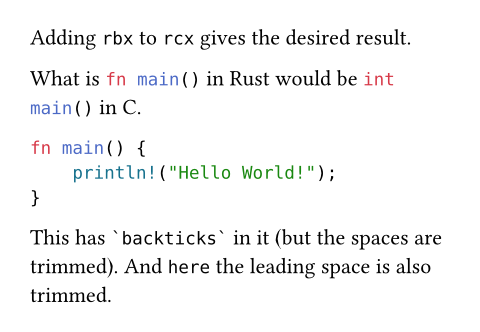
Adding `rbx` to `rcx` gives
the desired result.
What is ```rust fn main()``` in Rust
would be ```c int main()``` in C.
```rust
fn main() {
println!("Hello World!");
}
```
This has ``` `backticks` ``` in it
(but the spaces are trimmed). And
``` here``` the leading space is
also trimmed.
You can also construct a raw element programmatically from a string (and provide the language tag via the optional lang parameter).
#raw("fn " + "main() {}", lang: "rust")

If no syntax highlighting is available by default for your specified language tag (or if you want to override the built-in definition), you may provide a custom syntax specification file to the syntaxes parameter.
Styling
By default, the raw element uses the DejaVu Sans Mono font (included with Typst), with a smaller font size of 0.8em (that is, 80% of the global font size). This is because monospace fonts tend to be visually larger than non-monospace fonts.
You can customize these properties with show-set rules:
// Switch to Cascadia Code for both
// inline and block raw.
#show raw: set text(font: "Cascadia Code")
// Reset raw blocks to the same size as normal text,
// but keep inline raw at the reduced size.
#show raw.where(block: true): set text(1em / 0.8)
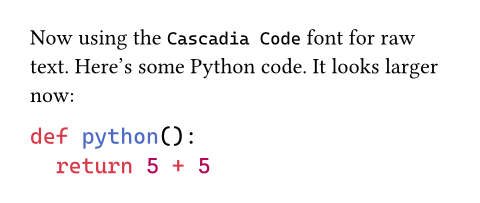
Now using the `Cascadia Code` font for raw text.
Here's some Python code. It looks larger now:
```py
def python():
return 5 + 5
```
In addition, you can customize the syntax highlighting colors by setting a custom theme through the theme parameter.
For complete customization of the appearance of a raw block, a show rule on raw.line could be helpful, such as to add line numbers.
Note that in raw text, typesetting features like hyphenation, overhang, CJK-Latin spacing, and (for raw blocks) justification will be disabled by default.
Syntax
This function has dedicated syntax that produces a raw element in both markup and code mode. You can enclose text in one or three-plus backtick characters (`) on both sides to make it raw. The number of backticks must be the same on both sides, and the enclosed text cannot contain a group of that many backticks in a row. Writing just two backticks (``) produces empty raw text.
Notable differences from Markdown include that single backticks can enclose text spanning multiple lines without removing indentation, and that the three-plus backtick syntax still interprets language tags when used inline.
Raw text enclosed in single backticks has no way to specify a language tag and is always treated as inline for use within a paragraph, i.e. the block parameter is false.
Raw syntax using three or more backticks has the following properties:
After the initial backticks, the raw block is only terminated by a sequence of the same number of backticks
To include text containing a sequence of backticks, the initial and final backticks must have at least one more backtick than the sequence.
If the raw text contains a linebreak, it will be block-level, otherwise it will be inline
This sets the
blockparameter totrueorfalseaccordingly.Text immediately after the initial backticks, up to the first whitespace, is treated as a language tag used for syntax highlighting
The specific rules for which text can be treated as the language tag are planned to change, and are explained in detail below.
The initial and final lines have special trimming behavior
For the initial line, if all characters following the initial backticks or language tag are whitespace, the entire line will be trimmed. However, if there are non-whitespace characters on that line, only a single space immediately following the initial backticks or language tag will be trimmed if present.
If the final line is entirely whitespace up to the closing backticks, it will be trimmed. Otherwise, if the last non-whitespace character of the final line is a backtick, then one space character will be trimmed from the end of the line if present.
Common indentation at the beginning of lines is trimmed
Typst will remove initial whitespace at the beginning of lines in the raw text that is shared between all lines, i.e. common indentation. Although this excludes text on the line with the initial backticks.
Typst first finds the line with the fewest initial whitespace characters that contains some non-whitespace characters, including the line with the closing backticks. Then Typst trims characters from every line equal to the number of initial whitespace characters in that line. Lines which are only whitespace will remove the same number of characters until they are empty, but will keep any extra trailing whitespace.
Note that this check treats tabs and spaces as equivalent characters for simplicity, and that it operates on numbers of Unicode code points, i.e. characters, not on byte lengths.
These properties of the three-plus backtick syntax allow for some use cases that may not be obvious:
To write text containing a sequence of backticks, enclose it with one or more backticks than the sequence:
```` enclosed```backticks````To write text that starts or ends with a backtick, add a space inside the opening and closing backticks:
``` `backticks` ```To write inline text highlighted with a language tag, add a space between the language tag and the text
```rust fn main() {}```To write inline text without any language tag, add a space after the initial backticks:
``` text```or use the single backtick syntax:`text`
Embedding strings with raw syntax
A common use-case for raw syntax is to embed data as strings with formatting by accessing the .text field on raw content to get the underlying string. This may also be paired with the bytes constructor to convert the string to bytes.
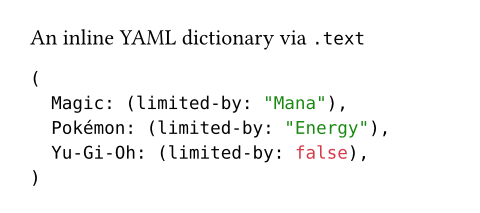
An inline YAML dictionary via `.text`
#yaml(bytes(
```yaml
Magic:
limited-by: Mana
Pokémon:
limited-by: Energy
Yu-Gi-Oh:
limited-by: false
```.text
// ^^^^ used as a string
))
Language tag changes
When using raw syntax with three or more backticks, text immediately after the initial backticks (up to the first whitespace) is treated as a language tag. However in the current version of Typst, only text that would be a valid Typst identifier is treated as the language tag. The first character not valid for an identifier will be interpreted as starting the raw text.
For example, in the current verion of Typst, if a raw block starts with C++, the identifier C will be the language tag, and the raw text will start with ++. If a raw block starts with ++C, it will have no language tag and the raw text will start with ++C.
To use language tags that are not valid as identifiers in the current version of Typst, you must use the lang parameter, either by calling the constructor with a string: #raw("text", lang: "..."), or by writing a set rule: #set raw(lang: "...").
In the next version of Typst, all text up to the first whitespace or backtick will be treated as the language tag, allowing a wider character set for language tags. Tags including spaces or backticks will still need to be set manually via the lang parameter.
Typst will alert you if your raw blocks will be interpreted differently in the next Typst version by emitting a warning.
Parameters
text
The raw text.
You can also use raw blocks creatively to create custom syntaxes for your automations.
 View example: Implementing a DSL using raw and show rules
// Parse numbers in raw blocks with the
// `mydsl` tag and sum them up.
#show raw.where(lang: "mydsl"): it => {
let sum = 0
for part in it.text.split("+") {
sum += int(part.trim())
}
sum
}
```mydsl
1 + 2 + 3 + 4 + 5
```

blockDefault: false
Whether the raw text is displayed as a separate block.
In markup mode, using one-backtick notation makes this false. Using three-backtick notation makes it true if the enclosed content contains at least one line break.
View example
// Display inline code in a small box
// that retains the correct baseline.
#show raw.where(block: false): box.with(
fill: luma(240),
inset: (x: 3pt, y: 0pt),
outset: (y: 3pt),
radius: 2pt,
)
// Display block code in a larger block
// with more padding.
#show raw.where(block: true): block.with(
fill: luma(240),
inset: 10pt,
radius: 4pt,
)
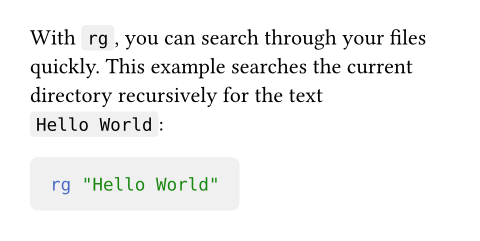
With `rg`, you can search through your files quickly.
This example searches the current directory recursively
for the text `Hello World`:
```bash
rg "Hello World"
```
langDefault: none
The language to interpret the raw text as for syntax highlighting.
In HTML export, this sets the data-lang attribute of the generated html.code element.
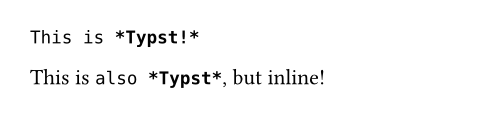
Apart from typical language tags known from Markdown, this supports the "typ", "typc", and "typm" tags for Typst markup, Typst code, and Typst math, respectively.
View example
```typ
This is *Typst!*
```
This is ```typ also *Typst*```, but inline!
alignDefault: start
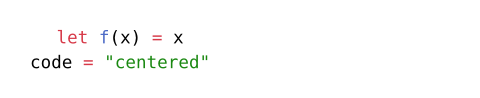
The horizontal alignment that each line in a raw block should have. This option is ignored if this is not a raw block (if specified block: false or single backticks were used in markup mode).
By default, this is set to start, meaning that raw text is aligned towards the start of the text direction inside the block by default, regardless of the current context’s alignment (allowing you to center the raw block itself without centering the text inside it, for example).
View example
#set raw(align: center)
```typc
let f(x) = x
code = "centered"
```
syntaxesDefault: ()
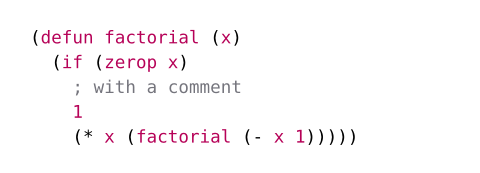
Additional syntax definitions to load. The syntax definitions should be in the sublime-syntax file format.
You can pass any of the following values:
- A path string or
pathto load a syntax file from. - Raw bytes from which the syntax should be decoded.
- An array where each item is one of the above.
View example
#set raw(syntaxes: "SExpressions.sublime-syntax")
```sexp
(defun factorial (x)
(if (zerop x)
; with a comment
1
(* x (factorial (- x 1)))))
```
themeDefault: auto
The theme to use for syntax highlighting. Themes should be in the tmTheme file format.
You can pass any of the following values:
none: Disables syntax highlighting.auto: Highlights with Typst’s default theme.- A path string or
pathto load a theme file from. - Raw bytes from which the theme should be decoded.
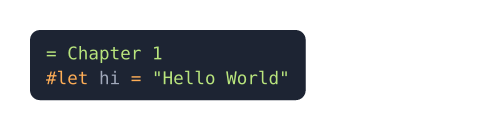
Applying a theme only affects the color of specifically highlighted text. It does not consider the theme’s foreground and background properties, so that you retain control over the color of raw text. You can apply the foreground color yourself with the text function and the background with a filled block. You could also use the xml function to extract these properties from the theme.
View example
#set raw(theme: "halcyon.tmTheme")
#show raw: it => block(
fill: rgb("#1d2433"),
inset: 8pt,
radius: 5pt,
text(fill: rgb("#a2aabc"), it)
)
```typ
= Chapter 1
#let hi = "Hello World"
```
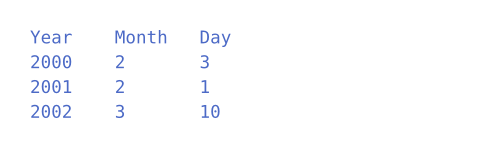
tab-sizeDefault: 2
The size for a tab stop in spaces. A tab is replaced with enough spaces to align with the next multiple of the size.
View example
#set raw(tab-size: 8)
```tsv
Year Month Day
2000 2 3
2001 2 1
2002 3 10
```
Definitions
lineElement
A highlighted line of raw text.
This is a helper element that is synthesized by raw elements.
It allows you to access various properties of the line, such as the line number, the raw non-highlighted text, the highlighted text, and whether it is the first or last line of the raw block.
number
The line number of the raw line inside of the raw block, starts at 1.
count
The total number of lines in the raw block.
text
The line of raw text.
body
The highlighted raw text.