
color
A color in a specific color space.
Typst supports:
- sRGB through the
rgbfunction - Device CMYK through the
cmykfunction - D65 Gray through the
lumafunction - Oklab through the
oklabfunction - Oklch through the
oklchfunction - Linear RGB through the
color.linear-rgbfunction - HSL through the
color.hslfunction - HSV through the
color.hsvfunction - Color spaces described by spot colorants through the
color.spottype
All color spaces except for CMYK and spot colorants have alpha channels.
Throughout the documentation, we use the term process color for colors that can be blended with each other (currently all colors other than spot colors). In this term, process signifies that the shade is being created throughout the printing process instead of ahead of time.
Example
#rect(fill: aqua)

Predefined colors
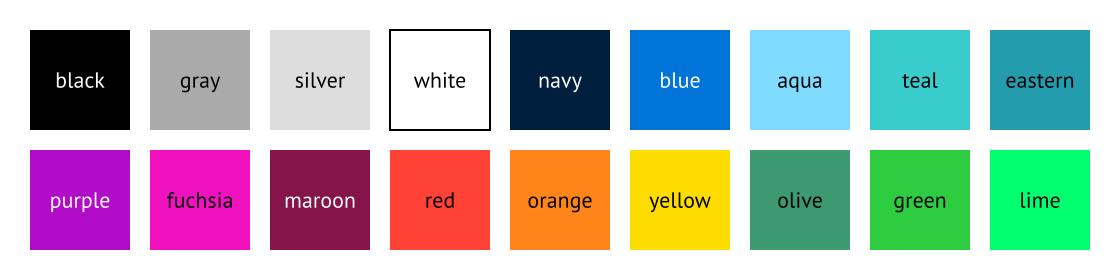
Typst defines the following built-in colors:
| Color | Definition |
|---|---|
black | luma(0) |
gray | luma(170) |
silver | luma(221) |
white | luma(255) |
navy | rgb("#001f3f") |
blue | rgb("#0074d9") |
aqua | rgb("#7fdbff") |
teal | rgb("#39cccc") |
eastern | rgb("#239dad") |
purple | rgb("#b10dc9") |
fuchsia | rgb("#f012be") |
maroon | rgb("#85144b") |
red | rgb("#ff4136") |
orange | rgb("#ff851b") |
yellow | rgb("#ffdc00") |
olive | rgb("#3d9970") |
green | rgb("#2ecc40") |
lime | rgb("#01ff70") |
The predefined colors and the most important color constructors are available globally and also in the color type’s scope, so you can write either color.red or just red.
Predefined color maps
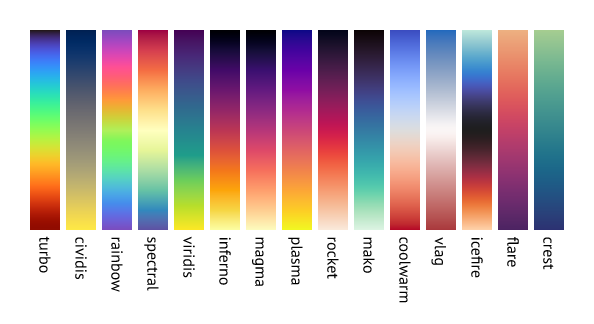
Typst also includes a number of preset color maps that can be used for gradients. These are simply arrays of colors defined in the module color.map.
#circle(fill: gradient.linear(..color.map.crest))

| Map | Details |
|---|---|
turbo | A perceptually uniform rainbow-like color map. Read this blog post for more details. |
cividis | A blue to gray to yellow color map. See this blog post for more details. |
rainbow | Cycles through the full color spectrum. This color map is best used by setting the interpolation color space to HSL. The rainbow gradient is not suitable for data visualization because it is not perceptually uniform, so the differences between values become unclear to your readers. It should only be used for decorative purposes. |
spectral | Red to yellow to blue color map. |
viridis | A purple to teal to yellow color map. |
inferno | A black to red to yellow color map. |
magma | A black to purple to yellow color map. |
plasma | A purple to pink to yellow color map. |
rocket | A black to red to white color map. |
mako | A black to teal to white color map. |
coolwarm | A blue to white to red color map with smooth transitions. |
vlag | A light blue to white to red color map. |
icefire | A light teal to black to orange color map. |
flare | A orange to purple color map that is perceptually uniform. |
crest | A light green to blue color map. |
Some popular presets are not included because they are not available under a free licence. Others, like Jet, are not included because they are not color blind friendly. Feel free to use or create a package with other presets that are useful to you!
Definitions
luma
Create a grayscale color.
A grayscale color is represented internally by a single lightness component.
These components are also available using the components method.
 View example
#for x in range(250, step: 50) {
box(square(fill: luma(x)))
}

lightness
The lightness component.
alpha
The alpha component.
color
Alternatively: The color to convert to grayscale.
If this is given, the lightness should not be given.
oklab
Create an Oklab color.
This color space is well suited for the following use cases:
- Color manipulation such as saturating while keeping perceived hue
- Creating grayscale images with uniform perceived lightness
- Creating smooth and uniform color transition and gradients
A linear Oklab color is represented internally by an array of four components:
- lightness (
ratio) - a (
floatorratio. Ratios are relative to0.4; meaning50%is equal to0.2) - b (
floatorratio. Ratios are relative to0.4; meaning50%is equal to0.2) - alpha (
ratio)
These components are also available using the components method.
View example
#square(
fill: oklab(27%, 20%, -3%, 50%)
)

lightness
The lightness component.
a
The a (“green/red”) component.
b
The b (“blue/yellow”) component.
alpha
The alpha component.
color
Alternatively: The color to convert to Oklab.
If this is given, the individual components should not be given.
oklch
Create an Oklch color.
This color space is well suited for the following use cases:
- Color manipulation involving lightness, chroma, and hue
- Creating grayscale images with uniform perceived lightness
- Creating smooth and uniform color transition and gradients
A linear Oklch color is represented internally by an array of four components:
- lightness (
ratio) - chroma (
floatorratio. Ratios are relative to0.4; meaning50%is equal to0.2) - hue (
angle) - alpha (
ratio)
These components are also available using the components method.
View example
#square(
fill: oklch(40%, 0.2, 160deg, 50%)
)

lightness
The lightness component.
chroma
The chroma component.
hue
The hue component.
alpha
The alpha component.
color
Alternatively: The color to convert to Oklch.
If this is given, the individual components should not be given.
linear-rgb
Create an RGB(A) color with linear luma.
This color space is similar to sRGB, but with the distinction that the color component are not gamma corrected. This makes it easier to perform color operations such as blending and interpolation. Although, you should prefer to use the oklab function for these.
A linear RGB(A) color is represented internally by an array of four components:
These components are also available using the components method.
View example
#square(fill: color.linear-rgb(
30%, 50%, 10%,
))

red
The red component.
green
The green component.
blue
The blue component.
alpha
The alpha component.
color
Alternatively: The color to convert to linear RGB(A).
If this is given, the individual components should not be given.
rgb
Create an RGB(A) color.
The color is specified in the sRGB color space.
An RGB(A) color is represented internally by an array of four components:
These components are also available using the components method.
View example
#square(fill: rgb("#b1f2eb"))
#square(fill: rgb(87, 127, 230))
#square(fill: rgb(25%, 13%, 65%))

red
The red component.
green
The green component.
blue
The blue component.
alpha
The alpha component.
hex
Alternatively: The color in hexadecimal notation.
Accepts three, four, six or eight hexadecimal digits and optionally a leading hash.
If this is given, the individual components should not be given.
View example
#text(16pt, rgb("#239dad"))[
*Typst*
]

color
Alternatively: The color to convert to RGB(a).
If this is given, the individual components should not be given.
cmyk
Create a CMYK color.
This is useful if you want to target a specific printer. The conversion to RGB for display preview might differ from how your printer reproduces the color.
A CMYK color is represented internally by an array of four components:
These components are also available using the components method.
Note that CMYK colors are not currently supported when PDF/A output is enabled.
View example
#square(
fill: cmyk(27%, 0%, 3%, 5%)
)

cyan
The cyan component.
magenta
The magenta component.
yellow
The yellow component.
key
The key component.
color
Alternatively: The color to convert to CMYK.
If this is given, the individual components should not be given.
hsl
Create an HSL color.
This color space is useful for specifying colors by hue, saturation and lightness. It is also useful for color manipulation, such as saturating while keeping perceived hue.
An HSL color is represented internally by an array of four components:
These components are also available using the components method.
View example
#square(
fill: color.hsl(30deg, 50%, 60%)
)

hue
The hue angle.
saturation
The saturation component.
lightness
The lightness component.
alpha
The alpha component.
color
Alternatively: The color to convert to HSL.
If this is given, the individual components should not be given.
hsv
Create an HSV color.
This color space is useful for specifying colors by hue, saturation and value. It is also useful for color manipulation, such as saturating while keeping perceived hue.
An HSV color is represented internally by an array of four components:
These components are also available using the components method.
View example
#square(
fill: color.hsv(30deg, 50%, 60%)
)

hue
The hue angle.
saturation
The saturation component.
value
The value component.
alpha
The alpha component.
color
Alternatively: The color to convert to HSL.
If this is given, the individual components should not be given.
components
Extracts the components of this color.
The size and values of this array depends on the color space. You can obtain the color space using space. Below is a table of the color spaces and their components:
| Color space | C1 | C2 | C3 | C4 |
|---|---|---|---|---|
luma | Lightness | |||
oklab | Lightness | a | b | Alpha |
oklch | Lightness | Chroma | Hue | Alpha |
linear-rgb | Red | Green | Blue | Alpha |
rgb | Red | Green | Blue | Alpha |
cmyk | Cyan | Magenta | Yellow | Key |
hsl | Hue | Saturation | Lightness | Alpha |
hsv | Hue | Saturation | Value | Alpha |
spot | Tint |
For the meaning and type of each individual value, see the documentation of the corresponding color space. The alpha component is optional and only included if the alpha argument is true. The length of the returned array depends on the number of components and whether the alpha component is included.
View example
// note that the alpha component is included by default
#rgb(40%, 60%, 80%).components()

alphaDefault: true
Whether to include the alpha component.
space
Returns the constructor function for this color’s space.
Returns one of:
View example
#let color = cmyk(1%, 2%, 3%, 4%)
#(color.space() == cmyk)

to-hex
Returns the color’s RGB(A) hex representation (such as #ffaa32 or #020304fe). The alpha component (last two digits in #020304fe) is omitted if it is equal to ff (255 / 100%).
lighten
Lightens a color by a given factor.
factor
The factor to lighten the color by.
darken
Darkens a color by a given factor.
factor
The factor to darken the color by.
saturate
Increases the saturation of a color by a given factor.
Only process colors can be saturated. If you want to saturate a spot color, convert it into a process color first.
factor
The factor to saturate the color by.
desaturate
Decreases the saturation of a color by a given factor.
Only process colors can be desaturated. If you want to desaturate a spot color, convert it into a process color first.
factor
The factor to desaturate the color by.
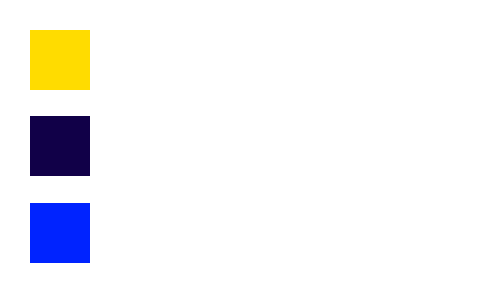
negate
Produces the complementary color using a provided color space. You can think of it as the opposite side on a color wheel.
View example
#square(fill: yellow)
#square(fill: yellow.negate())
#square(fill: yellow.negate(space: rgb))
spaceDefault: auto
The color space used for the transformation. By default, a perceptual color space is used.
rotate
Rotates the hue of the color by a given angle.
This function only works on color models with a well-defined hue component, i.e. Oklch, HSL, and HSV.
angle
The angle to rotate the hue by.
spaceanyDefault: oklch
The color space used to rotate. By default, this happens in a perceptual color space (oklch).
mix
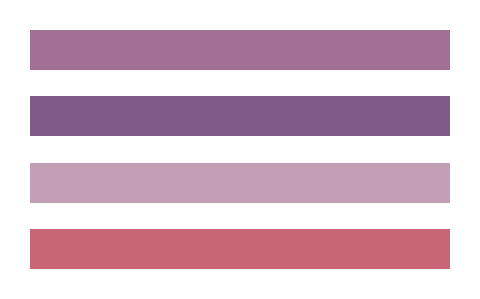
Create a color by mixing two or more colors.
In color spaces with a hue component (HSL, HSV, Oklch), only two colors can be mixed at once. Mixing more than two colors in such a space will result in an error!
View example
#set block(height: 20pt, width: 100%)
#block(fill: red.mix(blue))
#block(fill: red.mix(blue, space: rgb))
#block(fill: color.mix(red, blue, white))
#block(fill: color.mix((red, 70%), (blue, 30%)))
colors
The colors, optionally with weights, specified as a pair (array of length two) of color and weight (float or ratio).
The weights do not need to add to 100%, they are relative to the sum of all weights.
spaceDefault: auto
The color space to mix in. By default, this happens in a perceptual color space (oklab) or, if all colors use the same spot colorant, using that colorant.
All colors will be converted into this color space.
transparentize
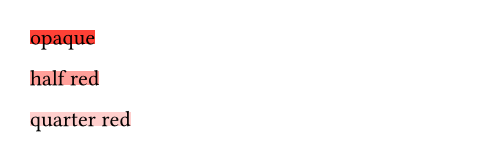
Makes a color more transparent by a given factor.
This method is relative to the existing alpha value. If the scale is positive, calculates alpha - alpha * scale. Negative scales behave like color.opacify(-scale).
View example
#block(fill: red)[opaque]
#block(fill: red.transparentize(50%))[half red]
#block(fill: red.transparentize(75%))[quarter red]
scale
The factor to change the alpha value by.
opacify
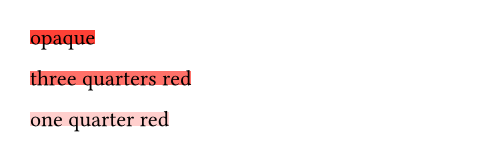
Makes a color more opaque by a given scale.
This method is relative to the existing alpha value. If the scale is positive, calculates alpha + scale - alpha * scale. Negative scales behave like color.transparentize(-scale).
View example
#let half-red = red.transparentize(50%)
#block(fill: half-red.opacify(100%))[opaque]
#block(fill: half-red.opacify(50%))[three quarters red]
#block(fill: half-red.opacify(-50%))[one quarter red]
scale
The scale to change the alpha value by.
spot
A spot colorant from which spot colors can be created.
Use spot colors to request a precise pigment in a professional print environment. Once you have created a spot colorant, you can create colors using its tint method.
Constructor
Create a new spot colorant.
name
Name of the spot colorant to use.
In production, this name will be manually checked and matched to a colorant, so this value needs to be unambiguous. It’s best to reference a color from a registry like PANTONE, HKS, RAL, Toyo & DIC, etc.
Values in here may be treated case-sensitively during production: "PANTONE 2221 C" and "PANTONE 2221 c" may be treated as separate colors. Ensure that you are using a consistent naming convention, either referencing a registry or through coordination with your production printing experts.
If this value is "all" and your print will involve multiple color plates, use of this colorant will result in the specified tint being applied equally to all plates. If you choose none, no colorant will be applied when using this color. Instead, you can use a spot color with the name none to indicate cuts or varnishes. Be sure to discuss this with your production printer!
We do not recommend using the names "Cyan", "Magenta", "Yellow", "Key", "Black", or their translations to your local language. Depending on your printer, they may or may not be interpreted as CMYK process colors.
| Variant | Details |
|---|---|
"all" | Use all available color plates instead of only a specific colorant. |
fallback
How to render this color if the specified colorant is not available.
Many mediums, like on-screen preview and household printers, will not have this specific spot colorant available. To display an approximation of the intended print, another, available color is used instead.
Definitions on spot
tint
Create a spot color at a specific tint of this colorant.
The tint represents what percentage of the colorant is applied. A tint of 100% means the colorant is applied at full strength, while 0% means no colorant is applied.
View example
#let pantone = color.spot(
"PANTONE 2221 C",
rgb("#239dad")
)
#square(fill: pantone.tint(100%))
#square(fill: pantone.tint(70%))
#square(fill: pantone.tint(40%))

value
The tint percentage, between 0% and 100%.