
skewElement
Skews content.
Skews an element in horizontal and/or vertical direction. The layout will act as if the element was not skewed unless you specify reflow: true.
Example
#skew(ax: -12deg)[
This is some fake italic text.
]

Parameters
axDefault: 0deg
The horizontal skewing angle.
 View example
#skew(ax: 30deg)[Skewed]

ayDefault: 0deg
The vertical skewing angle.
View example
#skew(ay: 30deg)[Skewed]

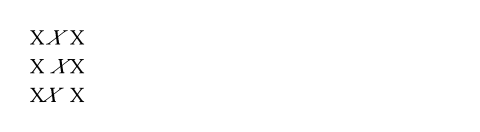
originDefault: center + horizon
The origin of the skew transformation.
The origin will stay fixed during the operation.
View example
X #box(skew(ax: -30deg, origin: center + horizon)[X]) X \
X #box(skew(ax: -30deg, origin: bottom + left)[X]) X \
X #box(skew(ax: -30deg, origin: top + right)[X]) X
reflowDefault: false
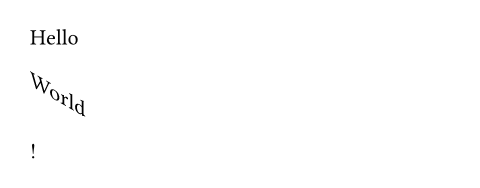
Whether the skew transformation impacts the layout.
If set to false, the skewed content will retain the bounding box of the original content. If set to true, the bounding box will take the transformation of the content into account and adjust the layout accordingly.
View example
Hello #skew(ay: 30deg, reflow: true, "World")!
body
The content to skew.