stretchElement
Stretches a glyph.
This function can also be used to automatically stretch the base of an attachment, so that it fits the top and bottom attachments.
Note that only some glyphs can be stretched, and which ones can depend on the math font being used. However, most math fonts are the same in this regard.
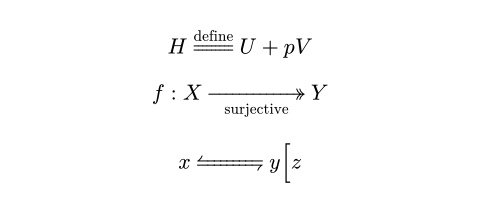
$ H stretch(=)^"define" U + p V $
$ f : X stretch(->>, size: #150%)_"surjective" Y $
$ x stretch(harpoons.ltrb, size: #3em) y
stretch(\[, size: #150%) z $
Parameters
body
The glyph to stretch.
sizeDefault: 100% + 0pt
The size to stretch to, relative to the maximum size of the glyph and its attachments.
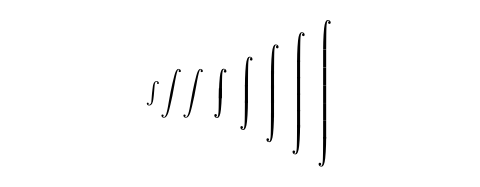
Note that the resulting glyph may not have the exact desired size. A stretched glyph may be either a pre-defined glyph, or a glyph assembled from building blocks provided by the font. The possible sizes may not cover the entire span. In the example below, when the size parameter is increased from 101% to 200%, the selected glyph remains the same, so the actual size does not change.
 View example: Size of ∫ growing discontinuously
#for size in (
100%, // short
101%, 200%, // tall
201%, 300%, 400%, 500%, 600%, // taller
) {
$stretch(integral, size: #size)$
}