
measureContextual
Measures the layouted size of content.
The measure function lets you determine the layouted size of content.
By default an infinite space is assumed, so the measured dimensions may
not necessarily match the final dimensions of the content.
If you want to measure in the current layout dimensions, you can combine
measure and layout.
Example
The same content can have a different size depending on the context that
it is placed into. In the example below, the #content is of course
bigger when we increase the font size.
#let content = [Hello!]
#content
#set text(14pt)
#content

For this reason, you can only measure when context is available.
#let thing(body) = context {
  let size = measure(body)
  [Width of "#body" is #size.width]
}

#thing[Hey] \
#thing[Welcome]
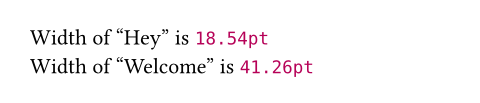
The measure function returns a dictionary with the entries width and
height, both of type length.
Parameters
width
The width available to layout the content.
Setting this to auto indicates infinite available width.
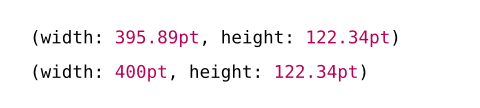
Note that using the width and height parameters of this function is
different from measuring a sized block containing the content. In
the following example, the former will get the dimensions of the inner
content instead of the dimensions of the block.
 View example
#context measure(lorem(100), width: 400pt)

#context measure(block(lorem(100), width: 400pt))
Default: auto
height
The height available to layout the content.
Setting this to auto indicates infinite available height.
Default: auto
content
The content whose size to measure.