
accentElement
Attaches an accent to a base.
In math mode, common accents are also available as named symbols that can be directly called (like functions) to attach them to some content.
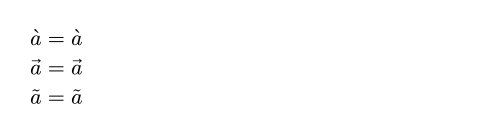
Example
$grave(a) = accent(a, `)$ \
$arrow(a) = accent(a, arrow)$ \
$tilde(a) = accent(a, \u{0303})$
Parameters
base
The base to which the accent is applied. May consist of multiple letters.
 View example
$arrow(A B C)$

accent
The accent to apply to the base.
Supported accents include:
| Accent | Name | Codepoint |
|---|---|---|
| Grave | grave | ` |
| Acute | acute | ´ |
| Circumflex | hat | ^ |
| Tilde | tilde | ~ |
| Macron | macron | ¯ |
| Dash | dash | ‾ |
| Breve | breve | ˘ |
| Dot | dot | . |
| Double dot, Diaeresis | dot.double, diaer | ¨ |
| Triple dot | dot.triple | \u{20db} |
| Quadruple dot | dot.quad | \u{20dc} |
| Circle | circle | ∘ |
| Double acute | acute.double | ˝ |
| Caron | caron | ˇ |
| Right arrow | arrow, -> | → |
| Left arrow | arrow.l, <- | ← |
| Left/Right arrow | arrow.l.r | ↔ |
| Right harpoon | harpoon | ⇀ |
| Left harpoon | harpoon.lt | ↼ |
sizeDefault: 100% + 0pt
The size of the accent, relative to the width of the base.
View example: Basic usage
$dash(A, size: #150%)$

Note that the resulting accent may not have the exact desired size. For example, an arrow may be either a pre-defined short glyph, or a long glyph assembled from building blocks (arrowhead + line) provided by the font. The sizes of the two possibilities may not cover the entire span. Consequently, arrows of certain intermediate sizes cannot be constructed.
View example: Size of arrow growing discontinuously
#for i in range(6) {
$ arrow(#box(
width: 0.4em + 0.3em * i,
fill: aqua,
height: 0.4em,
)) $
}

dotlessDefault: true
Whether to remove the dot on top of lowercase i and j when adding a top accent.
This enables the dtls OpenType feature.
View example
$hat(dotless: #false, i)$
