
array
A sequence of values.
You can construct an array by enclosing a comma-separated sequence of values in parentheses. The values do not have to be of the same type.
You can access and update array items with the .at() method. Indices are zero-based and negative indices wrap around to the end of the array. You can iterate over an array using a for loop. Arrays can be added together with the + operator, joined together and multiplied with integers.
Note: An array of length one needs a trailing comma, as in (1,). This is to disambiguate from a simple parenthesized expressions like (1 + 2) * 3. An empty array is written as ().
Example
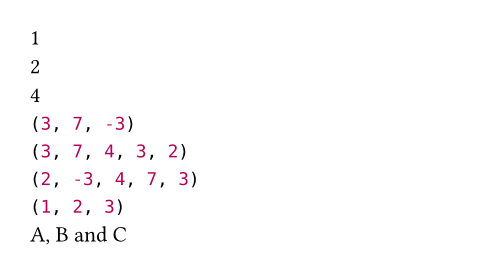
#let values = (1, 7, 4, -3, 2)
#values.at(0) \
#(values.at(0) = 3)
#values.at(-1) \
#values.find(calc.even) \
#values.filter(calc.odd) \
#values.map(calc.abs) \
#values.rev() \
#(1, (2, 3)).flatten() \
#(("A", "B", "C")
.join(", ", last: " and "))
Constructor
Converts a value to an array.
Note that this function is only intended for conversion of a collection-like value to an array, not for creation of an array from individual items. Use the array syntax (1, 2, 3) (or (1,) for a single-element array) instead.
 View example
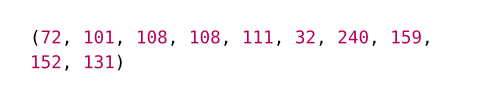
#let hi = "Hello 😃"
#array(bytes(hi))
value
The value that should be converted to an array.
Definitions
len
The number of values in the array.
first
Returns the first item in the array. May be used on the left-hand side an assignment. Returns the default value if the array is empty or fails with an error is no default value was specified.
defaultany
A default value to return if the array is empty.
last
Returns the last item in the array. May be used on the left-hand side of an assignment. Returns the default value if the array is empty or fails with an error is no default value was specified.
defaultany
A default value to return if the array is empty.
at
Returns the item at the specified index in the array. May be used on the left-hand side of an assignment. Returns the default value if the index is out of bounds or fails with an error if no default value was specified.
index
The index at which to retrieve the item. If negative, indexes from the back.
defaultany
A default value to return if the index is out of bounds.
push
Adds a value to the end of the array.
valueanyRequiredPositional
The value to insert at the end of the array.
pop
Removes the last item from the array and returns it. Fails with an error if the array is empty.
insert
Inserts a value into the array at the specified index, shifting all subsequent elements to the right. Fails with an error if the index is out of bounds.
To replace an element of an array, use at.
index
The index at which to insert the item. If negative, indexes from the back.
valueanyRequiredPositional
The value to insert into the array.
remove
Removes the value at the specified index from the array and return it.
index
The index at which to remove the item. If negative, indexes from the back.
defaultany
A default value to return if the index is out of bounds.
slice
Extracts a subslice of the array. Fails with an error if the start or end index is out of bounds.
start
The start index (inclusive). If negative, indexes from the back.
endDefault: none
The end index (exclusive). If omitted, the whole slice until the end of the array is extracted. If negative, indexes from the back.
count
The number of items to extract. This is equivalent to passing start + count as the end position. Mutually exclusive with end.
contains
Whether the array contains the specified value.
This method also has dedicated syntax: You can write 2 in (1, 2, 3) instead of (1, 2, 3).contains(2).
valueanyRequiredPositional
The value to search for.
find
Searches for an item for which the given function returns true and returns the first match or none if there is no match.
searcher
The function to apply to each item. Must return a boolean.
position
Searches for an item for which the given function returns true and returns the index of the first match or none if there is no match.
searcher
The function to apply to each item. Must return a boolean.
View example
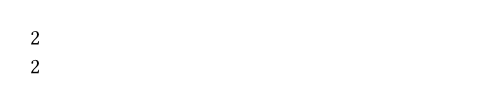
#let values = (1, 7, 4, 6, 9)
#values.position(x => calc.even(x)) \
// Or equivalently:
#values.position(calc.even)
range
Create an array consisting of a sequence of numbers.
If you pass just one positional parameter, it is interpreted as the end of the range. If you pass two, they describe the start and end of the range.
This function is available both in the array function’s scope and globally.
View example
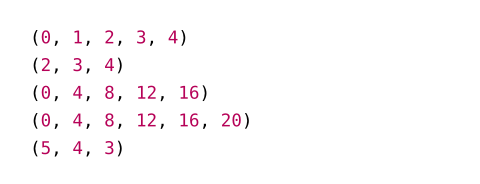
#range(5) \
#range(2, 5) \
#range(20, step: 4) \
#range(21, step: 4) \
#range(5, 2, step: -1)
startDefault: 0
The start of the range (inclusive).
end
The end of the range.
inclusiveDefault: false
Whether end is inclusive.
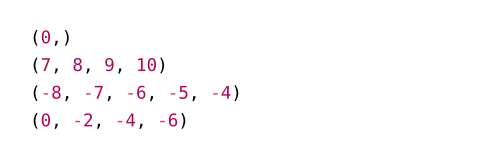
View example
#range(0, inclusive: true) \
#range(7, 10, inclusive: true) \
#range(-8, -4, inclusive: true) \
#range(-6, step: -2, inclusive: true)
stepDefault: 1
The distance between the generated numbers.
filter
Produces a new array with only the items from the original one for which the given function returns true.
test
The function to apply to each item. Must return a boolean.
map
Produces a new array in which all items from the original one were transformed with the given function.
mapper
The function to apply to each item.
enumerate
Returns a new array with the values alongside their indices.
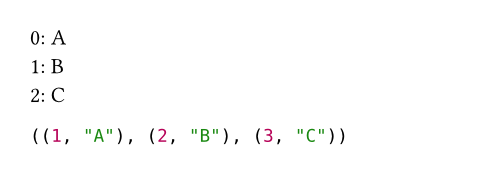
The returned array consists of (index, value) pairs in the form of length-2 arrays. These can be destructured with a let binding or for loop.
View example
#for (i, value) in ("A", "B", "C").enumerate() {
[#i: #value \ ]
}
#("A", "B", "C").enumerate(start: 1)
startDefault: 0
The index returned for the first pair of the returned list.
zip
Zips the array with other arrays.
Returns an array of arrays, where the ith inner array contains all the ith elements from each original array.
If the arrays to be zipped have different lengths, they are zipped up to the last element of the shortest array and all remaining elements are ignored.
This function is variadic, meaning that you can zip multiple arrays together at once: (1, 2).zip(("A", "B"), (10, 20)) yields ((1, "A", 10), (2, "B", 20)).
exactDefault: false
Whether all arrays have to have the same length. For example, (1, 2).zip((1, 2, 3), exact: true) produces an error.
others
The arrays to zip with.
fold
Folds all items into a single value using an accumulator function.
View example
#let array = (1, 2, 3, 4)
#array.fold(0, (acc, x) => acc + x)

initanyRequiredPositional
The initial value to start with.
folder
The folding function. Must have two parameters: One for the accumulated value and one for an item.
sum
Sums all items (works for all types that can be added).
defaultany
What to return if the array is empty. Must be set if the array can be empty.
product
Calculates the product of all items (works for all types that can be multiplied).
defaultany
What to return if the array is empty. Must be set if the array can be empty.
any
Whether the given function returns true for any item in the array.
test
The function to apply to each item. Must return a boolean.
all
Whether the given function returns true for all items in the array.
test
The function to apply to each item. Must return a boolean.
flatten
Combine all nested arrays into a single flat one.
rev
Return a new array with the same items, but in reverse order.
split
Split the array at occurrences of the specified value.
View example
#(1, 1, 2, 3, 2, 4, 5).split(2)

atanyRequiredPositional
The value to split at.
join
Combine all items in the array into one.
separatorDefault: none
A value to insert between each item of the array.
lastany
An alternative separator between the last two items.
defaultnone or anyDefault: none
What to return if the array is empty.
intersperse
Returns an array with a copy of the separator value placed between adjacent elements.
View example
#("A", "B", "C").intersperse("-")

separatoranyRequiredPositional
The value that will be placed between each adjacent element.
chunks
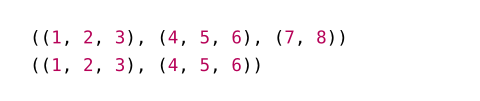
Splits an array into non-overlapping chunks, starting at the beginning, ending with a single remainder chunk.
All chunks but the last have chunk-size elements. If exact is set to true, the remainder is dropped if it contains less than chunk-size elements.
View example
#let array = (1, 2, 3, 4, 5, 6, 7, 8)
#array.chunks(3) \
#array.chunks(3, exact: true)
chunk-size
How many elements each chunk may at most contain.
exactDefault: false
Whether to discard the remainder if its size is less than chunk-size.
windows
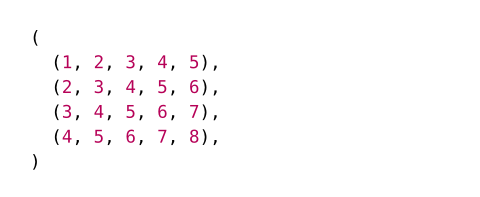
Returns sliding windows of window-size elements over an array.
If the array length is less than window-size, this will return an empty array.
View example
#let array = (1, 2, 3, 4, 5, 6, 7, 8)
#array.windows(5)
window-size
How many elements each window will contain.
sorted
Return a sorted version of this array, optionally by a given key function. The sorting algorithm used is stable.
Returns an error if a pair of values selected for comparison could not be compared, or if the key or comparison function (if given) yield an error.
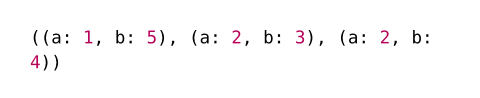
To sort according to multiple criteria at once, e.g. in case of equality between some criteria, the key function can return an array. The results are in lexicographic order.
View example
#let array = (
(a: 2, b: 4),
(a: 1, b: 5),
(a: 2, b: 3),
)
#array.sorted(key: it => (it.a, it.b))
key
If given, applies this function to each element in the array to determine the keys to sort by.
by
If given, uses this function to compare every two elements in the array.
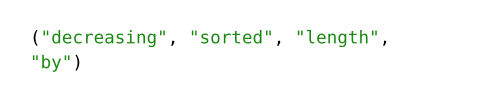
The function will receive two elements in the array for comparison, and should return a boolean indicating their order: true indicates that the elements are in order, while false indicates that they should be swapped. To keep the sort stable, if the two elements are equal, the function should return true.
If this function does not order the elements properly (e.g., by returning false for both (x, y) and (y, x), or for (x, x)), the resulting array will be in unspecified order.
When used together with key, by will be passed the keys instead of the elements.
View example
#(
"sorted",
"by",
"decreasing",
"length",
).sorted(
key: s => s.len(),
by: (l, r) => l >= r,
)
dedup
Deduplicates all items in the array.
Returns a new array with all duplicate items removed. Only the first element of each duplicate is kept.
View example
#(3, 3, 1, 2, 3).dedup()

key
If given, applies this function to each element in the array to determine the keys to deduplicate by.
View example
#("apple", "banana", " apple ").dedup(key: s => s.trim())

to-dict
Converts an array of pairs into a dictionary. The first value of each pair is the key, the second the value.
If the same key occurs multiple times, the last value is selected.
View example
#(
("apples", 2),
("peaches", 3),
("apples", 5),
).to-dict()

reduce
Reduces the elements to a single one, by repeatedly applying a reducing operation.
If the array is empty, returns none, otherwise, returns the result of the reduction.
The reducing function is a closure with two arguments: an “accumulator”, and an element.
For arrays with at least one element, this is the same as array.fold with the first element of the array as the initial accumulator value, folding every subsequent element into it.
View example
#let array = (2, 1, 4, 3)
#array.reduce((acc, x) => calc.max(acc, x))

reducer
The reducing function. Must have two parameters: One for the accumulated value and one for an item.