
termsElement
A list of terms and their descriptions.
Displays a sequence of terms and their descriptions vertically. When the descriptions span over multiple lines, they use hanging indent to communicate the visual hierarchy.
Example
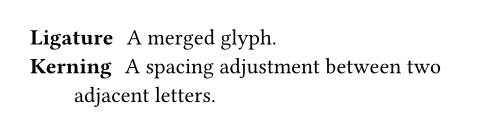
/ Ligature: A merged glyph.
/ Kerning: A spacing adjustment
between two adjacent letters.
Syntax
This function also has dedicated syntax: Starting a line with a slash, followed by a term, a colon and a description creates a term list item.
Parameters
tightDefault: true
Defines the default spacing of the term list. If it is false, the items are spaced apart with paragraph spacing. If it is true, they use paragraph leading instead. This makes the list more compact, which can look better if the items are short.
In markup mode, the value of this parameter is determined based on whether items are separated with a blank line. If items directly follow each other, this is set to true; if items are separated by a blank line, this is set to false. The markup-defined tightness cannot be overridden with set rules.
 View example
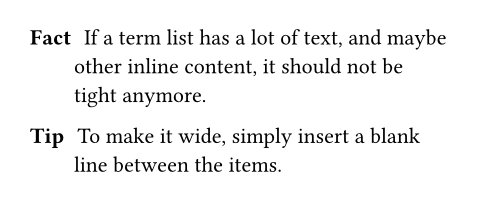
/ Fact: If a term list has a lot
of text, and maybe other inline
content, it should not be tight
anymore.
/ Tip: To make it wide, simply
insert a blank line between the
items.
separatorDefault: h(amount: 0.6em, weak: true)
The separator between the item and the description.
If you want to just separate them with a certain amount of space, use h(2cm, weak: true) as the separator and replace 2cm with your desired amount of space.
View example
#set terms(separator: [: ])
/ Colon: A nice separator symbol.

indentDefault: 0pt
The indentation of each item.
hanging-indentDefault: 2em
The hanging indent of the description.
This is in addition to the whole item’s indent.
View example
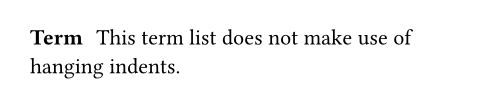
#set terms(hanging-indent: 0pt)
/ Term: This term list does not
make use of hanging indents.
spacingDefault: auto
The spacing between the items of the term list.
If set to auto, uses paragraph leading for tight term lists and paragraph spacing for wide (non-tight) term lists.
children
The term list’s children.
When using the term list syntax, adjacent items are automatically collected into term lists, even through constructs like for loops.
View example
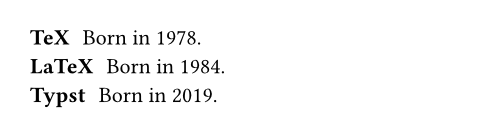
#for (year, product) in (
"1978": "TeX",
"1984": "LaTeX",
"2019": "Typst",
) [/ #product: Born in #year.]
Definitions
itemElement
A term list item.
term
The term described by the list item.
description
The description of the term.