cancelElement
Displays a diagonal line over a part of an equation.
This is commonly used to show the elimination of a term.
Example
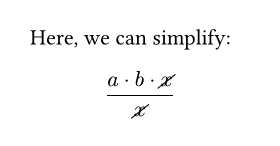
Here, we can simplify:
$ (a dot b dot cancel(x)) /
cancel(x) $
Parameters
cancel(
content,length: relative,inverted: bool,cross: bool,angle: autoanglefunction,stroke: lengthcolorgradientstroketilingdictionary,
) → contentbody
The content over which the line should be placed.
lengthDefault: 100% + 0.3em
The length of the line, relative to the length of the diagonal spanning the whole element being “cancelled”. A value of 100% would then have the line span precisely the element’s diagonal.
 View example
$ a + cancel(x, length: #200%)
- cancel(x, length: #200%) $

invertedDefault: false
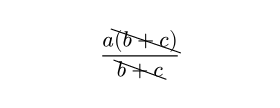
Whether the cancel line should be inverted (flipped along the y-axis). For the default angle setting, inverted means the cancel line points to the top left instead of top right.
View example
$ (a cancel((b + c), inverted: #true)) /
cancel(b + c, inverted: #true) $
crossDefault: false
Whether two opposing cancel lines should be drawn, forming a cross over the element. Overrides inverted.
View example
$ cancel(Pi, cross: #true) $

angleDefault: auto
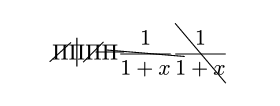
How much to rotate the cancel line.
- If given an angle, the line is rotated by that angle clockwise with respect to the y-axis.
- If
auto, the line assumes the default angle; that is, along the rising diagonal of the content box. - If given a function
angle => angle, the line is rotated, with respect to the y-axis, by the angle returned by that function. The function receives the default angle as its input.
View example
$ cancel(Pi)
cancel(Pi, angle: #0deg)
cancel(Pi, angle: #45deg)
cancel(Pi, angle: #90deg)
cancel(1/(1+x), angle: #(a => a + 45deg))
cancel(1/(1+x), angle: #(a => a + 90deg)) $
strokeDefault: 0.05em
How to stroke the cancel line.
View example
$ cancel(
sum x,
stroke: #(
paint: red,
thickness: 1.5pt,
dash: "dashed",
),
) $