
strikeElement
Strikes through text.
Example
This is #strike[not] relevant.

Parameters
strike(
stroke: autolengthcolorgradientstroketilingdictionary,offset: autolength,extent: length,background: bool,content,
) → contentstrokeDefault: auto
How to stroke the line.
If set to auto, takes on the text’s color and a thickness defined in the current font.
Note: Please don’t use this for real redaction as you can still copy paste the text.
 View example
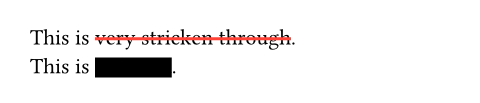
This is #strike(stroke: 1.5pt + red)[very stricken through]. \
This is #strike(stroke: 10pt)[redacted].
offsetDefault: auto
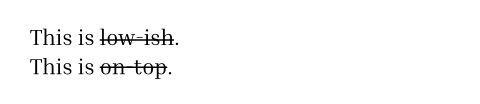
The position of the line relative to the baseline. Read from the font tables if auto.
This is useful if you are unhappy with the offset your font provides.
View example
#set text(font: "Inria Serif")
This is #strike(offset: auto)[low-ish]. \
This is #strike(offset: -3.5pt)[on-top].
extentDefault: 0pt
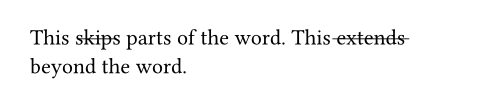
The amount by which to extend the line beyond (or within if negative) the content.
View example
This #strike(extent: -2pt)[skips] parts of the word.
This #strike(extent: 2pt)[extends] beyond the word.
backgroundDefault: false
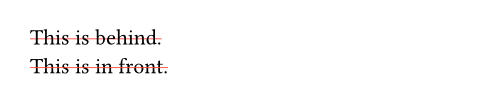
Whether the line is placed behind the content.
View example
#set strike(stroke: red)
#strike(background: true)[This is behind.] \
#strike(background: false)[This is in front.]
body
The content to strike through.