
polygonElement
A closed polygon.
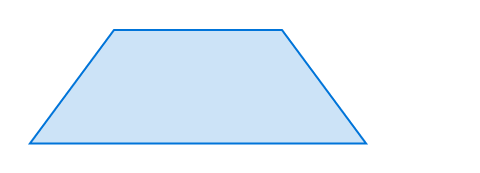
The polygon is defined by its corner points and is closed automatically.
Example
#polygon(
fill: blue.lighten(80%),
stroke: blue,
(20%, 0pt),
(60%, 0pt),
(80%, 2cm),
(0%, 2cm),
)
Parameters
fillDefault: none
How to fill the polygon.
When setting a fill, the default stroke disappears. To create a rectangle with both fill and stroke, you have to configure both.
fill-ruleDefault: "non-zero"
The drawing rule used to fill the polygon.
See the curve documentation for an example.
| Variant | Details |
|---|---|
"non-zero" | Specifies that “inside” is computed by a non-zero sum of signed edge crossings. |
"even-odd" | Specifies that “inside” is computed by an odd number of edge crossings. |
strokeDefault: auto
How to stroke the polygon.
Can be set to none to disable the stroke or to auto for a stroke of 1pt black if and only if no fill is given.
vertices
The vertices of the polygon. Each point is specified as an array of two relative lengths.
Definitions
regular
A regular polygon, defined by its size and number of vertices.
 View example
#polygon.regular(
fill: blue.lighten(80%),
stroke: blue,
size: 30pt,
vertices: 3,
)

fill
How to fill the polygon. See the general polygon’s documentation for more details.
stroke
How to stroke the polygon. See the general polygon’s documentation for more details.
sizeDefault: 1em
The diameter of the circumcircle of the regular polygon.
verticesDefault: 3
The number of vertices in the polygon.