
overlineElement
Adds a line over text.
Example
#overline[A line over text.]

Parameters
overline(
stroke: autolengthcolorgradientstroketilingdictionary,offset: autolength,extent: length,evade: bool,background: bool,content,
) → contentstrokeDefault: auto
How to stroke the line.
If set to auto, takes on the text’s color and a thickness defined in the current font.
 View example
#set text(fill: olive)
#overline(
stroke: green.darken(20%),
offset: -12pt,
[The Forest Theme],
)

offsetDefault: auto
The position of the line relative to the baseline. Read from the font tables if auto.
View example
#overline(offset: -1.2em)[
The Tale Of A Faraway Line II
]

extentDefault: 0pt
The amount by which to extend the line beyond (or within if negative) the content.
View example
#set overline(extent: 4pt)
#set underline(extent: 4pt)
#overline(underline[Typography Today])

evadeDefault: true
Whether the line skips sections in which it would collide with the glyphs.
View example
#overline(
evade: false,
offset: -7.5pt,
stroke: 1pt,
extent: 3pt,
[Temple],
)

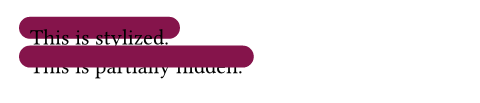
backgroundDefault: false
Whether the line is placed behind the content it overlines.
View example
#set overline(stroke: (thickness: 1em, paint: maroon, cap: "round"))
#overline(background: true)[This is stylized.] \
#overline(background: false)[This is partially hidden.]
body
The content to add a line over.