

queryContextual
Finds elements in the document.
The query function lets you search your document for elements of a particular type or with a particular label. To use it, you first need to ensure that context is available.
Finding elements
In the example below, we manually create a table of contents instead of using the outline function.
To do this, we first query for all headings in the document at level 1 and where outlined is true. Querying only for headings at level 1 ensures that, for the purpose of this example, sub-headings are not included in the table of contents. The outlined field is used to exclude the “Table of Contents” heading itself.
Note that we open a context to be able to use the query function.
#set page(numbering: "1")
#heading(outlined: false)[
Table of Contents
]
#context {
let chapters = query(
heading.where(
level: 1,
outlined: true,
)
)
for chapter in chapters {
let loc = chapter.location()
let nr = counter(page).display(at: loc)
[#chapter.body #h(1fr) #nr \ ]
}
}
= Introduction
#lorem(10)
#pagebreak()
== Sub-Heading
#lorem(8)
= Discussion
#lorem(18)
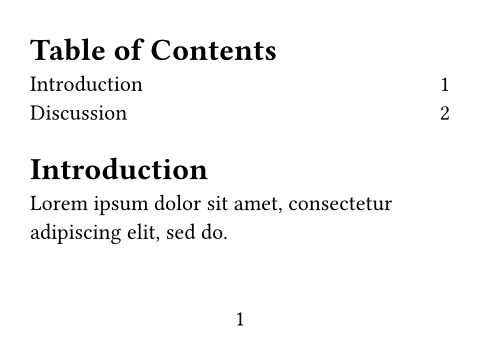
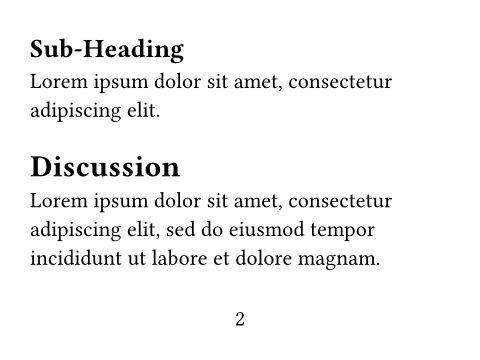
To get the page numbers, we first get the location of the elements returned by query with location. We then also retrieve the page numbering and page counter at that location and apply the numbering to the counter.
A word of caution
To resolve all your queries, Typst evaluates and layouts parts of the document multiple times. However, there is no guarantee that your queries can actually be completely resolved. If you aren’t careful a query can affect itself—leading to a result that never stabilizes.
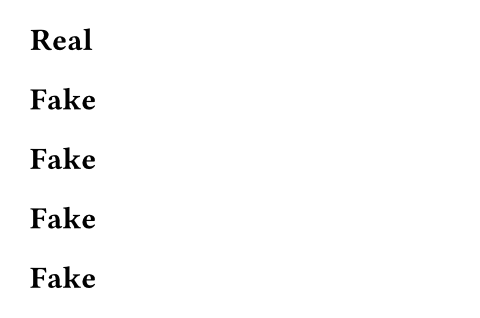
In the example below, we query for all headings in the document. We then generate as many headings. In the beginning, there’s just one heading, titled Real. Thus, count is 1 and one Fake heading is generated. Typst sees that the query’s result has changed and processes it again. This time, count is 2 and two Fake headings are generated. This goes on and on. As we can see, the output has a finite amount of headings. This is because Typst simply gives up after a few attempts.
In general, you should try not to write queries that affect themselves. The same words of caution also apply to other introspection features like counters and state.
= Real
#context {
let elems = query(heading)
let count = elems.len()
count * [= Fake]
}
Command line queries
You can also perform queries from the command line, using the typst eval command. This command evaluates Typst code, potentially in the context of a document, and outputs the resulting value in serialized form. It takes the code to evaluate as its first argument and (optionally) the path to a document via --in.
Consider the following example.typ file which contains some invisible metadata:
#metadata("This is a note") <note>You can execute a query on it as follows using Typst’s CLI.
$ typst eval 'query(<note>)' --in example.typ
[
  {
    "func": "metadata",
    "value": "This is a note",
    "label": "<note>"
  }
]
This command tells Typst to compile example.typ and then run the code query(<note>) with access to the resulting document.
Note: The code is surrounded with quotes to avoid special characters being interpreted by the shell. How to quote strings depends on your platform/shell.
Retrieving a specific field
Frequently, you’re interested in only one specific field of the resulting elements. In the case of the metadata element, the value field is the interesting one. You can extract just this field by adjusting the code.
$ typst eval 'query(<note>).map(it => it.value)' --in example.typ
["This is a note"]
If you are interested in just a single element, you can also use the first() method to extract just it.
$ typst eval 'query(<note>).first().value' --in example.typ
"This is a note"
Querying for a specific export target
In case you need to query a document when exporting for a specific target, you can use the --target argument. Valid values are paged, and html (if the html feature is enabled).
Parameters
target
Can be
- an element function like a
headingorfigure, - a
<label>, - a more complex selector like
heading.where(level: 1), - or
selector(heading).before(here()).
Only locatable element functions are supported.