
dictionary
A map from string keys to values.
You can construct a dictionary by enclosing comma-separated key: value pairs in parentheses. The values do not have to be of the same type. Since empty parentheses already yield an empty array, you have to use the special (:) syntax to create an empty dictionary.
A dictionary is conceptually similar to an array, but it is indexed by strings instead of integers. You can access and create dictionary entries with the .at() method. If you know the key statically, you can alternatively use field access notation (.key) to access the value. To check whether a key is present in the dictionary, use the in keyword.
You can iterate over the pairs in a dictionary using a for loop. This will iterate in the order the pairs were inserted / declared initially.
Dictionaries can be added with the + operator and joined together. They can also be spread into a function call or another dictionary1 with the ..spread operator. In each case, if a key appears multiple times, the last value will override the others.
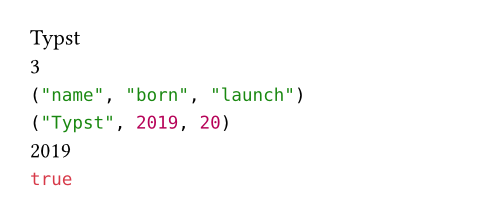
Example
#let dict = (
name: "Typst",
born: 2019,
)
#dict.name \
#(dict.launch = 20)
#dict.len() \
#dict.keys() \
#dict.values() \
#dict.at("born") \
#dict.insert("city", "Berlin")
#("name" in dict)
- 1When spreading into a dictionary, if all items between the parentheses are spread, you have to begin the container with
(:, as in(: ..dict, ..other_dict). Otherwise the container is inferred to be an array and an error is raised.
Constructor
Converts a value into a dictionary.
Note that this function is only intended for conversion of a dictionary-like value to a dictionary, not for creation of a dictionary from individual pairs. Use the dictionary syntax (key: value) instead. Also see array.to-dict for converting arrays to dictionaries.
 View example
#dictionary(sys).at("version")

value
The value that should be converted to a dictionary.
Definitions
len
The number of pairs in the dictionary.
at
Returns the value associated with the specified key in the dictionary.
May be used on the left-hand side of an assignment if the key is already present in the dictionary. Returns the default value if the key is not part of the dictionary or fails with an error if no default value was specified.
Values may also be accessed with field syntax (e.g. (key: 42).key) if no default is needed.
key
The key at which to retrieve the item.
defaultany
A default value to return if the key is not part of the dictionary.
insert
Inserts a new pair into the dictionary. If the dictionary already contains this key, the value is updated.
To insert multiple pairs at once, you can alternatively add another dictionary with the += operator.
key
The key of the pair that should be inserted.
valueanyRequiredPositional
The value of the pair that should be inserted.
remove
Removes a pair from the dictionary by key and return the value.
key
The key of the pair to remove.
defaultany
A default value to return if the key does not exist.
keys
Returns the keys of the dictionary as an array in insertion order.
values
Returns the values of the dictionary as an array in insertion order.
pairs
Returns the keys and values of the dictionary as an array of pairs. Each pair is represented as an array of length two.
filter
Produces a new dictionary with only the pairs from the original one for which the given function returns true.
View example: Basic usage
#{
(a: 0, b: 1, c: 2)
.filter(v => v > 0)
}

View example: Filtering based on the key instead of the value
#{
(a: 0, b: 1, c: 2)
.pairs()
.filter(((k, v)) => k != "a")
.to-dict()
}
test
The function to apply to each value. Must return a boolean.
map
Produces a new dictionary where the keys are the same, but the values are transformed with the given function.
View example
#(a: 0, b: 1, c: 2).map(v => v + 1)

mapper
The function to apply to each value.