
gradient
A color gradient.
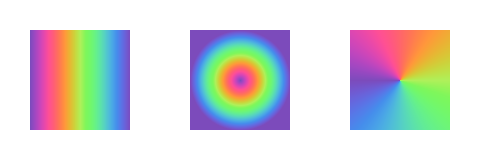
Typst supports linear gradients through the gradient.linear function, radial gradients through the gradient.radial function, and conic gradients through the gradient.conic function.
A gradient can be used for the following purposes:
- As a fill to paint the interior of a shape:
rect(fill: gradient.linear(..)) - As a stroke to paint the outline of a shape:
rect(stroke: 1pt + gradient.linear(..)) - As the fill of text:
set text(fill: gradient.linear(..)) - As a color map you can sample from:
gradient.linear(..).sample(50%)
Examples
#stack(
dir: ltr,
spacing: 1fr,
square(fill: gradient.linear(..color.map.rainbow)),
square(fill: gradient.radial(..color.map.rainbow)),
square(fill: gradient.conic(..color.map.rainbow)),
)
Gradients are also supported on text, but only when setting the relativeness to either auto (the default value) or "parent". To create word-by-word or glyph-by-glyph gradients, you can wrap the words or characters of your text in boxes manually or through a show rule.
#set text(fill: gradient.linear(red, blue))
#let rainbow(content) = {
set text(fill: gradient.linear(..color.map.rainbow))
box(content)
}
This is a gradient on text, but with a #rainbow[twist]!

Stops
A gradient is composed of a series of stops. Each of these stops has a color and an offset. The offset is a ratio between 0% and 100% or an angle between 0deg and 360deg. The offset is a relative position that determines how far along the gradient the stop is located. The stop’s color is the color of the gradient at that position. You can choose to omit the offsets when defining a gradient. In this case, Typst will space all stops evenly.
Typst predefines color maps that you can use as stops. See the color documentation for more details.
Relativeness
The location of the 0% and 100% stops depends on the dimensions of a container. This container can either be the shape that it is being painted on, or the closest surrounding container. This is controlled by the relative argument of a gradient constructor. By default, gradients are relative to the shape they are being painted on, unless the gradient is applied on text, in which case they are relative to the closest ancestor container.
Typst determines the ancestor container as follows:
- For shapes that are placed at the root/top level of the document, the closest ancestor is the page itself.
- For other shapes, the ancestor is the innermost
blockorboxthat contains the shape.
Color spaces and interpolation
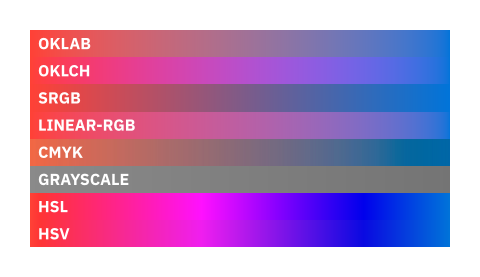
Gradients can be interpolated in any color space. By default, gradients are interpolated in the Oklab color space, which is a perceptually uniform color space. This means that the gradient will be perceived as having a smooth progression of colors. This is particularly useful for data visualization.
However, you can choose to interpolate the gradient in any supported color space you want, but beware that some color spaces are not suitable for perceptually interpolating between colors. Consult the table below when choosing an interpolation space.
| Color space | Perceptually uniform? |
|---|---|
| Oklab | Yes |
| Oklch | Yes |
| sRGB | No |
| linear-RGB | Yes |
| CMYK | No |
| Grayscale | Yes |
| HSL | No |
| HSV | No |
Direction
Some gradients are sensitive to direction. For example, a linear gradient has an angle that determines its direction. Typst uses a clockwise angle, with 0° being from left to right, 90° from top to bottom, 180° from right to left, and 270° from bottom to top.
#stack(
dir: ltr,
spacing: 1fr,
square(fill: gradient.linear(red, blue, angle: 0deg)),
square(fill: gradient.linear(red, blue, angle: 90deg)),
square(fill: gradient.linear(red, blue, angle: 180deg)),
square(fill: gradient.linear(red, blue, angle: 270deg)),
)

Note on file sizes
Gradients can be quite large, especially if they have many stops. This is because gradients are stored as a list of colors and offsets, which can take up a lot of space. In SVG export, gradients are stored as a list of color.rgb colors replicating the original color space with an optimized number of extra stops in between. In PDF export, the same applies to gradients in the color.oklab, color.oklch, color.hsv, color.hsl, and color.linear-rgb color spaces. This avoids needing to encode these color spaces in your PDF file, but it does add extra stops to your gradient, which can increase the file size.
Definitions
linear
Creates a new linear gradient, in which colors transition along a straight line.
 View example
#rect(
width: 100%,
height: 20pt,
fill: gradient.linear(
..color.map.viridis,
),
)

stops
The color stops of the gradient.
spaceDefault: auto
The color space in which to interpolate the gradient.
Defaults to a perceptually uniform color space called Oklab.
relativeDefault: auto
The relative placement of the gradient.
The parent of an element is the innermost box or block that contains the element, or, if there is none, the page itself.
| Variant | Details |
|---|---|
"self" | Relative to itself (its own bounding box). |
"parent" | Relative to its parent (the parent’s bounding box). |
dirDefault: ltr
The direction of the gradient.
angle
The angle of the gradient.
radial
Creates a new radial gradient, in which colors radiate away from an origin.
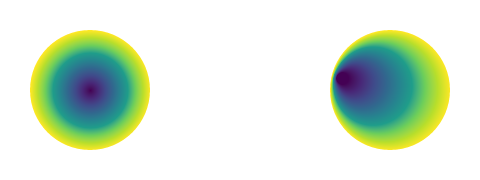
The gradient is defined by two circles: the focal circle and the end circle. The focal circle is a circle with center focal-center and radius focal-radius, that defines the points at which the gradient starts and has the color of the first stop. The end circle is a circle with center center and radius radius, that defines the points at which the gradient ends and has the color of the last stop. The gradient is then interpolated between these two circles.
Using these four values, also called the focal point for the starting circle and the center and radius for the end circle, we can define a gradient with more interesting properties than a basic radial gradient.
View example
#stack(
dir: ltr,
spacing: 1fr,
circle(fill: gradient.radial(
..color.map.viridis,
)),
circle(fill: gradient.radial(
..color.map.viridis,
focal-center: (10%, 40%),
focal-radius: 5%,
)),
)
stops
The color stops of the gradient.
spaceDefault: auto
The color space in which to interpolate the gradient.
Defaults to a perceptually uniform color space called Oklab.
relativeDefault: auto
The relative placement of the gradient.
The parent of an element is the innermost box or block that contains the element, or, if there is none, the page itself.
| Variant | Details |
|---|---|
"self" | Relative to itself (its own bounding box). |
"parent" | Relative to its parent (the parent’s bounding box). |
centerDefault: (50%, 50%)
The center of the end circle of the gradient.
A value of (50%, 50%) means that the end circle is centered inside of its container.
radiusDefault: 50%
The radius of the end circle of the gradient.
By default, it is set to 50%. The ending radius must be bigger than the focal radius.
focal-centerDefault: auto
The center of the focal circle of the gradient.
The focal center must be inside of the end circle.
A value of (50%, 50%) means that the focal circle is centered inside of its container.
By default it is set to the same as the center of the last circle.
focal-radiusDefault: 0%
The radius of the focal circle of the gradient.
The focal center must be inside of the end circle.
By default, it is set to 0%. The focal radius must be smaller than the ending radius.
conic
Creates a new conic gradient, in which colors change radially around a center point.
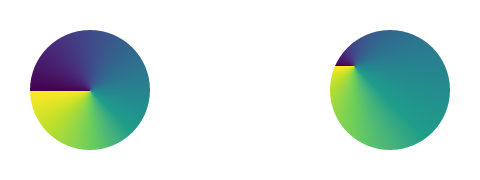
You can control the center point of the gradient by using the center argument. By default, the center point is the center of the shape.
View example
#stack(
dir: ltr,
spacing: 1fr,
circle(fill: gradient.conic(
..color.map.viridis,
)),
circle(fill: gradient.conic(
..color.map.viridis,
center: (20%, 30%),
)),
)
stops
The color stops of the gradient.
angleDefault: 0deg
The angle of the gradient.
spaceDefault: auto
The color space in which to interpolate the gradient.
Defaults to a perceptually uniform color space called Oklab.
relativeDefault: auto
The relative placement of the gradient.
The parent of an element is the innermost box or block that contains the element, or, if there is none, the page itself.
| Variant | Details |
|---|---|
"self" | Relative to itself (its own bounding box). |
"parent" | Relative to its parent (the parent’s bounding box). |
centerDefault: (50%, 50%)
The center of the circle of the gradient.
A value of (50%, 50%) means that the circle is centered inside of its container.
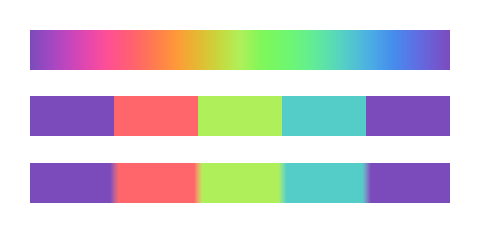
sharp
Creates a sharp version of this gradient.
Sharp gradients have discrete jumps between colors, instead of a smooth transition. They are particularly useful for creating color lists for a preset gradient.
View example
#set rect(width: 100%, height: 20pt)
#let grad = gradient.linear(..color.map.rainbow)
#rect(fill: grad)
#rect(fill: grad.sharp(5))
#rect(fill: grad.sharp(5, smoothness: 20%))
steps
The number of stops in the gradient.
smoothnessDefault: 0%
How much to smooth the gradient.
repeat
Repeats this gradient a given number of times, optionally mirroring it at every second repetition.
View example
#circle(
radius: 40pt,
fill: gradient
.radial(aqua, white)
.repeat(4),
)

repetitions
The number of times to repeat the gradient.
mirrorDefault: false
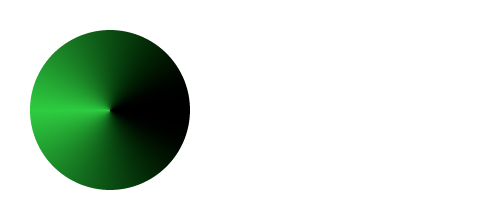
Whether to mirror the gradient at every second repetition, i.e., the first instance (and all odd ones) stays unchanged.
View example
#circle(
radius: 40pt,
fill: gradient
.conic(green, black)
.repeat(2, mirror: true)
)
kind
Returns the kind of this gradient.
stops
Returns the stops of this gradient.
space
Returns the mixing space of this gradient.
relative
Returns the relative placement of this gradient.
angle
Returns the angle of this gradient.
Returns none if the gradient is neither linear nor conic.
center
Returns the center of this gradient.
Returns none if the gradient is neither radial nor conic.
radius
Returns the radius of this gradient.
Returns none if the gradient is not radial.
focal-center
Returns the focal-center of this gradient.
Returns none if the gradient is not radial.
focal-radius
Returns the focal-radius of this gradient.
Returns none if the gradient is not radial.
sample
Sample the gradient at a given position.
The position is either a position along the gradient (a ratio between 0% and 100%) or an angle. Any value outside of this range will be clamped.
t
The position at which to sample the gradient.
samples
Samples the gradient at multiple positions at once and returns the results as an array.
ts
The positions at which to sample the gradient.